Developer/Connection method/Link Type/Basic Specifications

Basic Specifications

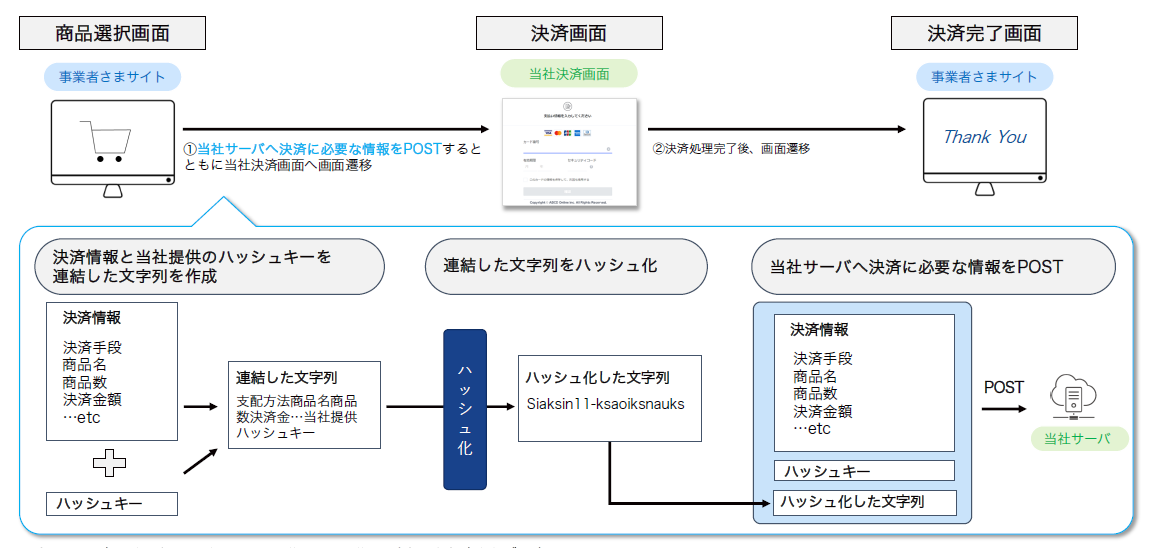
This is a schematic diagram illustrating the integration and processing between the merchant's site using the link type and SBPS's payment screen.

Example: Purchase request

The above is a diagram to help you understand the overview (the interactions between the merchant and SBPS’s server required in (2) are omitted from the diagram). For details, see the List of Provided Functions and the Interface Specifications ( Link Type Purchase Request / Link Type Customer Payment Information Registration Request / Link Type Recurring Billing (Fixed Term/Pay as You Go) Application Request).

The link system communicates using HTTPS POST requests/responses, and uses Shift_JIS for the character encoding (character set). The basic structure is shown below.

HTML
                     <form action="https://stbfep.sps-system.com/xxxx/xxxxxxxx" method="POST">
	<input type="hidden" name="タグエレメント名1" value="設定内容1">
	<input type="hidden" name="タグエレメント名2" value="設定内容2">
	<input type="submit" value="submit">
</form>
                
  • Port 443 is used here.
  • In each request/response, tag elements must not be removed, even if there are unset fields. Please leave unset fields blank. You can only delete tag elements that are part of the repeating details section.
  • Requests sent from SBPS’s system to the merchant are not returned in the sequential order defined in the Interface Field Definitions; they are returned in a random order. If retrieving request information from SBPS, please use the tag element specification to obtain the information.
  • If there is a connection between screens, a "submit" attribute must be included.
  • After the environment is built, SBPS will contact you regarding the destination to be specified for the "action" attribute in the "form" tag.

To view sample code for each function, see the Link System Specification (Sample Code).

HTML
                     <form action="https://stbfep.sps-system.com/xxxx/xxxxxxxx" method="POST">
	<input type="hidden" name="pay_method" value="credit">
	<input type="hidden" name="merchant_id" value="20053">
	<input type="hidden" name="service_id" value="001">
	<input type="hidden" name="cust_code" value="XXXXXXXX-XXXX-XXXX-XXXX-XXXXXXXXXXXX">
	<input type="hidden" name="sps_cust_no" value="">
	<input type="hidden" name="sps_payment_no" value="">
	<input type="hidden" name="order_id" value="YYYYYYYY-YYYY-YYYY-YYYY-YYYYYYYYYYYY">
	<input type="hidden" name="item_id" value="1">
	・・・     (中略)     ・・・
	<input type="hidden" name="free_csv" value="">
		<!--商品明細行繰り返し start -->
		<!-—明細を使用しない場合は丸ごと省略可能です -->
		<input type="hidden" name="dtl_rowno" value="1">
		<input type="hidden" name="dtl_item_id" value="SBPS-001">
		<input type="hidden" name="dtl_item_name" value="テスト明細商品名1">
		<input type="hidden" name="dtl_item_count" value="1">
		<input type="hidden" name="dtl_tax" value="50">
		<input type="hidden" name="dtl_amount" value="1000">
		<input type="hidden" name="dtl_rowno" value="2">
		<input type="hidden" name="dtl_item_id value="SBPS-002">
		<input type="hidden" name="dtl_item_name" value="テスト明細商品名2">
		<input type="hidden" name="dtl_item_count" value="1">
		<input type="hidden" name="dtl_tax" value="100">
 		<input type="hidden" name="dtl_amount" value="2000">
		<!--//商品明細行繰り返し end -->
	<input type="hidden" name="request_date" value="20081015214001">
	<input type="hidden" name="limit_second" value="600">
	<input type="hidden" name="sps_hashcode" value="ab8be32d9602530076219c3424122db77d5202bb">
	<input type="submit" value="submit">
</form>
                

The following data types may be used in interfaces that utilize the link system:

Notation in specification documentsData typeValid charactersRemarks
NumericOne byte 0–9
(Single-byte numbers)
Signs such as “-” are not allowed.
XSingle-byte charactersThe following ASCII characters:
A-Z (single-byte uppercase letters)
a-z (single-byte lowercase letters)
0-9 (single-byte digits)
(*) Asterisk
(-) Hyphen
(_) Underscore
(@) at symbol
Single-byte space
(.) Period
Single-byte symbols other than the ones shown on the left are not allowed.
Double-byte characters such as ( + and / ) will not be automatically converted to single-byte.
For NET CASH payments, the following product IDs can be used:
Single-byte uppercase letters, single-byte lowercase letters, single-byte digits, hyphen,
Only underscores are allowed.
MMulti-byte character stringDouble-byte characters:
Hiragana
Katakana
Alphanumeric characters
Symbols
JIS level-1 kanji set
JIS level-2 kanji set
Single-byte characters:
Shown in the X section
above
Single-byte characters
As exceptions, the following eight characters are not allowed:
JIS character encoding
(―) Dash: Row 01, Code 2130, +D
(\) Backslash: Row 01, Code 2140, +0
(~) Wave dash: Row 01, Code 2140, +1
(‖) Parallel: Row 01, Code 2140, +2
(-) Nut dash: Row 01, Code 2150, +D
(¢) Cent sign: Row 01, Code 2170, +1
(£) Pound sign: Row 01, Code 2170, +2
(¬) Negation arithmetic symbol: Row 02, Code 2240, +C
*For details, refer to the JIS X 0208 Character Code Table
(Level 2). Platform dependent characters are not allowed.
Single-byte katakana characters will be converted into double-byte katakana characters.

To calculate hashes, first concatenate the value of each tag element (excluding hashes) in the request in the order of item definitions, and finally append the hash key supplied by SBPS. Then, convert the result to UTF-8 and use the SHA-1 algorithm for hash calculation.

* It is necessary to concatenate every item value you set whether or not it is a value for a mandatory field.

* If single-byte spaces are included before and/or after the item value of each field, it is necessary to delete the spaces from the value before it is used for concatenation.

* The checksum for the purchase result (return screen) from SBPS is created using Shift_JIS as the character code.

<<Example of hash generation>>

Credit ①12345 ②001③TEST1 ④ABCD1234⑤Goods001⑥Test product ⑦2000 ⑧....⑨387ccbcbf1139f292・・・⑩

(1) Payment method, provided by SBPS (pay_method)

(2) Merchant ID, provided by SBPS (merchant_id)

(3) Service ID, provided by SBPS (service_id)

(4) Customer ID, unique to the merchant (cust_code)

(5) Purchase ID, unique to the merchant (order_id)

(6) Product ID, unique to the merchant (item_id)

(7) Product name, unique to the merchant (item_name)

(8) Monetary amount including tax (amount)

(9) * All other configured items, concatenated in the order of item definitions as shown above

(10) Hash key, provided by SBPS

As described above, a hash is obtained by concatenating item values in the order of item definitions, converting this concatenated string into UTF-8, and then calculating a hash with the SHA-1 algorithm. The calculated hash is set to sps_hashcode.

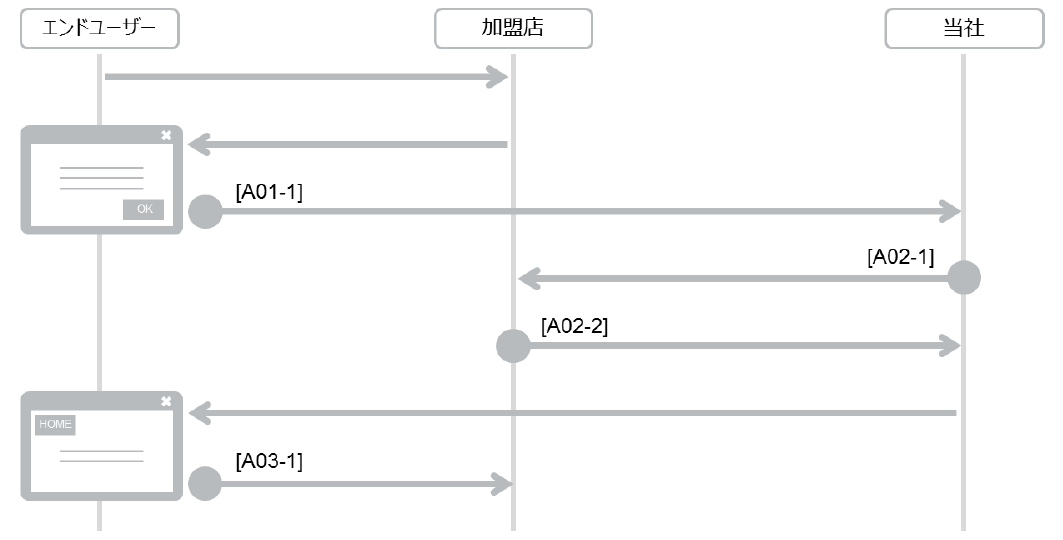
Example: Purchase Request

1) Purchase request (purchase or cancellation)

2) Notify the result of the purchase request (purchase or cancellation) [Result CGI]

3) Return a response to the result CGI

4) Notify the result of the purchase request (purchase or cancellation). Additionally, return the end user's screen to the merchant.

Decision on the provision of merchant services in Purchase request should be based on the Processed result status of "Purchase result CGI" from us.
For more information, see Link Type Purchase request (Types of Processed result Status in Interface Specification Purchase result CGI).

The result CGI response is a response to an HTTP request. Write the HTTP message body in CSV format (comma separated) as follows: the processing result, followed by a comma, then the error message. If the processing result is "OK," the error message does not need to be included.

Example: If OK: OK,

If NG: NG, Already sold out.

*An alert email will be sent if the error message is over 100 characters. Keep the error message within 100 characters.
*The result CGI request has a timeout set, so please respond promptly.
In case of a timeout, the previously mentioned purchase result notification email will be sent.

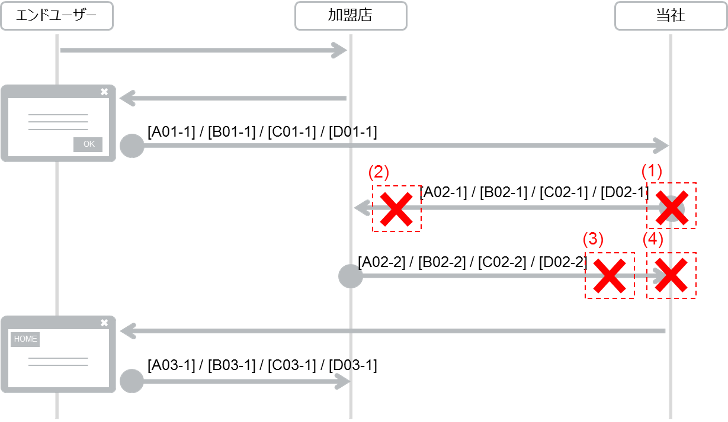
<<Concept and response regarding post-processing at the merchant>>

(1) When the result CGI and processing result are both OK

(2) When the result CGI is OK but the processing result shows a failure

* There may be a payment discrepancy. Take action in a similar way as when receiving a result notification alert email as described in the Link System Specification (Basic Specifications).
*If a payment discrepancy has occurred, SBPS may check with the merchant and then conduct refund processing. Note that in this case, it may take time before the end user is actually refunded.

(3) Note that in this case, it may take time before the end user is actually refunded.

* If you receive a failure in the result CGI, conduct post-processing for the failure, and return a response with OK.

The result (return screen) stores a [TOKEN] element for checking the transaction token. This element is not included in the hash calculation. The strings are concatenated in Shift_JIS when generating the hash in this case.

  • Request and result CGI
  • Result (return screen)

* The checksum is converted to uppercase before being set.

The screen is displayed in a format that suits the terminal used, based on the value set for the terminal used in the request and the HTTP request agent. If the user terminal type is not set, the processing defaults to PC (terminal type 0).

Terminal usedTerminal type in the requestHTTP AgentDisplayed screen formatCustomizable?
Yes/No
Remarks
PC0PCPC formatYesSeparate adjustments are required for customization
Mobile1The three major carriersMobile formatNoMobile screen (for all three major carriers) / white background color
Android *10AndroidAndroid formatNoScreens are generated and displayed specifically for Android devices
iPhone *10iPhoneiPhone formatNoScreens are generated and displayed specifically for iPhone devices
iPad *10iPadPC formatYesThe basic PC screen format is displayed.

*1: If no specification is made regarding the terminal used when applying, the PC screen format will be displayed.

Purchase Result Notification Email Alerts is a Email Alert that notifies you in real time of the situation in the event that some kind of failure occurs after Payment completed and Purchase result CGI data cannot be exchanged between us and merchant.

You can specify the destination email address when you apply.

Purchase Result Notification Email Alerts Trigger Conditions and Notification Error Codes

#Notification conditionsNotification Error CodesExamples of applicable cases
1The purchase result CGI is not successfully sent from SBPS1301We were unable to connect to the merchant server.
2The purchase result CGI is sent from SBPS, but is not received by the merchant1301The response from the merchant server to us returns a response other than HTTP status 200.
3The purchase result CGI response from the merchant is not received by SBPS1401Timed out before we received a response from the merchant server
4The purchase result CGI response from the merchant is received by SBPS, but the processing result was neither OK nor NG1101Purchase result Processed result of CGI response is linked with Character string other than OK / NG or empty.

Impact on end users when purchase result notification emails are issued

Purchase Result Notification Email Alerts are sent by our company after the Payment is completed. This email is sent when the Payment is complete, but no service is provided. This situation may indicate a "discrepancy between payment status and service provision (Payment inconsistency)".

What to do when receiving a purchase result notification alert email

If you receive a Purchase Result Notification Email Alerts, follow the steps below to check the status and use the table to determine what to do.

  1. Payment Check status

    Search for the transaction in our Admin portal / Payment management tool and check the Payment status.

  2. Checking the service delivery status

    Check the service delivery status (Provided or Unoffered) of the merchant side.

  3. Decision on response

    Determine your response based on your Payment status and service delivery status.

Payment statusService delivery statuscorrespondence
Payment complete (money deposited)Already providedNot required
Payment complete (money deposited)UnofferedRefund payment or provide service
Payment not complete (≠ money deposited)Already providedStop service
Payment not complete (≠ money deposited)UnofferedNot required

*The timing differs for each payment method in terms of billing the end user for the payment amount. As such, consider the timing for billing when deciding on actions after receiving an alert email. For details on the timing for billing the end user, see the service specification for the relevant payment method.

Example of a purchase result notification alert email

Below is an example of an alert email sent by SBPS to the merchant.

[Subject] SBPS Multi-Payment Service - Purchase Result Notification Error Report
[Body] An error occurred when processing the purchase result notification.
Merchant Name: ○○○○
Time of incident: 2006/10/05 12:27:15
Point of incident 1. Nature of incident: 3
[Processing records]
Merchant ID 12345
Service ID 001
Purchase ID: 762f97146a5858131229dae931295fb6
Tracking ID: 93899499957845
SBPS Transaction ID: 8fae36dace2f2b69ed56924538dcfd85
[Details of request for purchase result CGI]
Processed result payment method: WebMoney
Status of processing result OK
Error code 1301
Purchase completion processing date and time: 20061005122715
– Legend –
Point of incident 1: Merchant 2: FEP 3: G/W 4: Financial Institution 5: Merchant -G/W
(Incident details) 1: Request/response error 2: Internal processing error 3: Connection error 4: Configuration error (Status of processing result) OK: Request processing OK NG: Request processing NG CR: Cancellation notice (recurring charge stopped)

* The content of these emails may change without notice.

Certificates at SBPS

All screens displayed by SBPS are SSL certified. Certificate are issued by Cybertrust Japan Co., Ltd. ( https://www.cybertrust.co.jp/). SSL communication is required for SBPS’s screen integration system, and requests must be made via HTTPS.

Redundancy

If there are multiple servers in a redundant configuration for sending and receiving result notifications, there is no need to specify primary and secondary servers. However, the destination URL for notifications must be the same for all servers.

Customer payment information storage, and customer ID settings

  • The end user's payment information is stored alongside the customer ID managed by the merchant, as set in the request. Therefore, please ensure that the customer ID managed by the merchant, as set in the request, is unique.
  • When handling a one-off customer in the merchant site, "reg_sps" can be entered at the start of the customer ID set in the purchase request to disable the function for managing customer payment information (no checkbox for storing information in the card details entry screen).
    *Payment with "reg_sps" is not allowed for Rakuten Pay (online payment) and the T-point program (online payment).

Source IPaddress for notifying each type of result CGI

  • Test environment: 61.215.213.47
  • Production environment: 61.215.213.20

* If communications are restricted in the merchant's environment, make sure to allow communications from the above IP addresses.

Domains for each screen displayed by SBPS (common for all payments)

  • Test environment: http://stbfep.sps-system.com/PATH_FOR_REQUEST
  • Production environment: https://fep.sps-system.com/PATH_FOR_REQUEST

* SBPS will contact you with the details on the connection destination for each request once the environment has been built.

* The connection destination is different for the test environment and production environment. Pay attention to the connection destination when switching to the production environment.

Available Encryption Protocols

Due to the regulations of PCI DSS (which SBPS complies with), SSL 3.0 and TLS 1.0 cannot be used.

In addition, there is a high possibility that the use of TLS 1.1 will be prohibited in the future because its vulnerabilities as an encryption method have been disclosed. Therefore, Merchants shall use TLS 1.2.

Link TypeApple PayPayments

Apple Pay on the Web is used for our Link Type Apple Pay payment.

For information on system requirements and restrictions, refer to the following:

https://developer.apple.com/documentation/apple_pay_on_the_web

AboutCustomer IDs

Do not use the following strings in a customer ID:

SPSTestUser0001 / SPSTestUser0002 / SPSTestUser0003 / SPSTestUser0004 / SPSTestUser0005

Number of Digits Shown in Field Definitions in Specifications

The number of digits shown in field definitions in specifications is the number of bytes. Even the number of digits of a multi-byte field shows the number of bytes.
The number of digits of a multi-byte field shows the number of digits before encoded.

Load Testing in the test environment

Due to the specifications of the payment institution, load testing in the test environment is not possible. Please contact us for details.

About Tracking ID

The tracking ID issued by us is a unique value for each payment method.

Available SSL

In the link type, the result CGI is requested for the URL specified by the merchant in each request. Since the request will be made via SSL communication, a valid SSL certificate must be implemented on the recipient (merchant server). Please refer to the table below for the main certificates that can be used for SSL communication with SBPS. Please note that the table below is based on SBPS’s SSL communication settings and connectivity records; it does not guarantee communication, so please confirm connectivity in advance.

<<SSL certificates that are confirmed to function with SSL communications>> (* As of February 2016)

NoUsable root certificatesName of certification companyNames of major certificate products
1Baltimore CyberTrust Root *1Cybertrust Japan Co., Ltd.SureServer[SHA-2] SureServer EV[SHA-2]
SureServer[2048bit] SureServer EV[2048bit]
GTE CyberTrust Global Root *1SureServer[2048bit] SureServer EV[2048bit]
2GlobalSignGMO GlobalSign K.K.EV SSL
3VeriSign Class 3 Public Primary Certification Authority – G5Symantec Website Security G.K.Secure Server ID, Global Server ID, Secure Server ID with EV, Global Server ID with EV
4GeoTrust Global CAGeoTrust Japan K.K.QuickSSL Premium, QuickSSL Premium Wildcard, True BusinessID, True BusinessID Wildcard
5Starfield Class 2 Certification Authority *1J Cert, Inc.Starfield Standard SSL, Starfield Deluxe SSL, Starfield EV SSL
6Security Communication RootCA2SECOM Trust Systems Co., Ltd.SECOM Passport for Web SR 3.0, SECOM Passport for Web EV 2.0
Security Communication RootCA1 *1SECOM Passport for Web SR 2.0, SECOM Passport for Web EV

*1: These certificates are no longer sold, and so they may be used until their expiry dates.

* Certificate product names may be changed by the certification company without notice. Contact the certification company for details if necessary.

*Depending on the merchant's system environment, implementing cross-root certificates may be necessary. For details, please contact the certification company. SBPS may not be able to provide answers regarding the merchant's environment configuration.

* SBPS will not accept requests to install root certificates or cross-signed root certificates in SBPS servers.

* Private SSL certificates may not be used. Only authentic SSL certificates may be used.

SSL certificates for the test environment

With the test environment, connections can be made using non-SSL communications. In this case, the destination URL (pagecon_url) for notifications through the interface in each request should be set with http:// at the beginning.

* Note that only SSL communications with an authentic SSL certificate may be used for the production environment.

* SBPS will not accommodate requests for implementing private SSL certificates in the test environment.

*If basic authentication has been configured, an error will occur and notifications will be unsuccessful. Make sure to disable the configuration for basic authentication.

Was this page helpful?