

 Content of this page
About Pay-easy Payment
The Pay-easy Payment Service is a payment service that allows end users to make a payment for goods and services through an ATM or internet banking using the information issued upon purchase.
The following methods of payment are available for end users:
<<ATM payment>>
Method for making a payment through an ATM that supports Pay-easy by taking notes of the collection agent number, customer number, and check number displayed on the screen after the completion of the purchase.
<<Internet banking payment (online type)>>
Method for making a payment using the Pay-easy Payment Service through a financial institution the end user has an account of by taking down the collection agent number, customer number, and check number displayed on the screen after the completion of the purchase.
<<Internet banking payment (information link type)>>
Method for making a payment using the Pay-easy Payment Service by accessing the Pay-easy special page of the specified bank through the link displayed on the screen after the completion of the purchase.
The following collection companies can be used for the Pay-easy Payment Service:
- WELLNET CORPORATION (hereinafter referred to as WELLNET)
- Densan System Co.,Ltd. (hereinafter referred to as Densan System)*
* Densan System can be used as the collection company for the Pay-easy Payment Service only when the Convenience Store Payment Service provided by SBPS is used through Densan System. Densan System cannot be used as the collection company only for the Pay-easy Payment Service.
The payment methods available for each collection company are as follows.
| Payment method | Payment type | WELLNET | Densan System |
|---|---|---|---|
| ATM payment | None | ○ | ○ |
| Internet banking payment | Online type | ○ | ○ |
| Information link type | 〇 | ○ |
Please check the following website for financial institutions that accept payments. Note that the URL may change.
<List of financial institutions at which Pay-easy Payment Service can be used>
WELLNET: https://multiple-payment.biz/pages/financial-institution-list.html
Densan System: https://www.econtext.jp/bank_list/list.html
For more information on the Pay-easy Payment Service, please refer to the following website. Note that the URL may change.
<Pay-easy Payment>
https://www.jampa.gr.jp/
Service Diagram
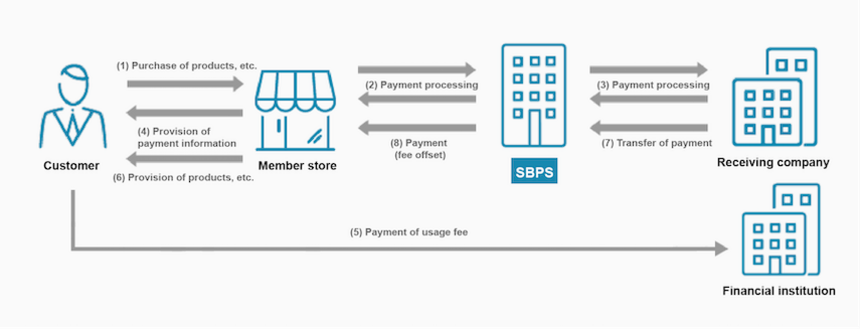
Main Features
- The payment can easily be made through an ATM or internet banking using the numbers displayed after purchase.
* Even the entry of the numbers is unnecessary when the payment is made directly through internet banking on the payment screen. - Deposits can be checked in close to real time, allowing the service to be provided to end users smoothly.
- SBPS reconciles the accounts receivable for deposits on behalf of Merchants, reducing the burden of customer deposits on Merchants.
Usage Information For End Users
Please refer to the service website for details on the purchasing procedure.
For end-user usage information, please refer to the FAQ (Payment /System Specifications > Pay-easy) or the page of each Financial institution.
Service Specifications
Basic Specifications
The available billing systems and billing system-specific basic specifications are as follows.
Billing Methods
| One-time charge | ○ |
|---|---|
| Recurring charge (simple) | × |
| Recurring charge (based on term or usage rate) | × |
Basic Specifications
| Billing method | Field | Specifications | |
|---|---|---|---|
| One-time charge | Close authorization settlement | Automated sales | ○ |
| Specified sales | × | ||
| Period for settlement | Settlement is not necessary because the auto close authorization settlement is performed. | ||
| Period for cancellation | There is no cancellation function because it is auto close authorization settlement. | ||
| Period for refund | Not refundable. * If refund is necessary, the Merchant shall handle it. | ||
| Due date of payment | A date (and time) between the next day and the 59th day from the date of purchase request process can be specified. * The setting varies by collection company. | ||
There are two payment deadline settings: predefined settings and payment request settings. Please see below for details on each setting.
<<Predefined setting (Mandatory setting)>>
A payment deadline setting that determines the payment deadline. When filing the application for the Online Payment ASP Service, specify the due date of payment shown above.
<<Payment request setting (Optional setting)>>
Payment deadline can be set for each payment request. The settings vary depending on the collection company and the connection method, so please check the following.
*Please set within the pre-set payment deadline. The setting specified in the request will take priority.
- Setting of due date of payment (payment request setting)
| Specified item | Densan System | WELLNET |
|---|---|---|
| Date (mmdd) specification | ○ | ○ |
| Time (hhmm) specification | × | ○ |
| Same day (0 days) specification | 〇 | ○ |
- Method for specifying due date of payment (payment request setting)
| Connection method | How to Set Up |
|---|---|
| Link Type | Specify through the free_csv tag element (free item) of the purchase request API. |
| API Type | Specify through the bill_date tag element (due date of payment) of the payment request API. |
Supported devices
The available devices are as follows.
| Device | Availability | Remarks |
|---|---|---|
| PC | ○ | – |
| Smartphone | ○ | – |
| Mobile | ○ | – |
List of Provided Functions
The following functions are provided. As for the payment administration tool, only the main functions are listed. For details, see the Payment Administration Tool Manual.
| Billing system/Close authorization settlement | Provided functions | Link Type | API Type | Payment management tool |
|---|---|---|---|---|
| One-time billing/Auto close authorization settlement | Purchase | ○ | ○ | – |
| Payment result reference | – | ※1 | – | |
| Deposit notification | ○ | ○ | – | |
| Overdue payment cancellation notification | ○ | ○ | – | |
| Deposit receipt re-notification | – | – | ○ | |
| Overdue payment cancellation re-notification | – | – | ○ |
The Pay-easy Payment Service provides functions and options related to deposits. The descriptions of functions and options are given below:
<<Deposit notification function>>
This function notifies merchants to the payment details SBPS get from collection companies. The timing of notifications varies depending on each collection company.
* After the Merchant is notified about a deposit receipt, it may be canceled in some cases. In such cases, a deposit cancel report is immediately sent by system notification and a deposit cancel confirmed report is sent by e-mail.
- Timing of notification of deposit notification service
| Type | WELLNET | Densan System |
|---|---|---|
| Prompt report | None | After a few minutes |
| Finalized notification | Real-time notification | After 3 to 10 business days |
<<Overdue payment cancellation notification function>>
This function notifies Merchants about bills unpaid after the specified due date through a batch process performed once every day.
*Batch processing will be carried out on business days and hours determined by SBPS. If there is a batch processing failure, SBPS will look into it and address the issue as soon as business hours start on the day of operation.
<<Deposit receipt notification retry service>>
If an error occurs in a deposit receipt notification, this option sends the deposit receipt notification again at certain intervals. This option is helpful when deposit receipt notifications cannot be received for some reasons such as a system maintenance at the Merchant.
The available re-notification timing and number of retries are shown below. Note that the retry is finished when the Merchant returns the response OK. If all the re-notifications end up in error, the Merchant support will report the failure of all the re-notifications on the next business day.
* If SBPS fails to receive the response from a Merchant, another deposit receipt notification may be sent again after the deposit receipt notification. We request Merchants to build a mechanism to avoid providing the service twice. In addition, we request Merchants to return "OK" if the deposit receipt notification is already received.
| Pattern | Timing of notification | Number of notifications |
|---|---|---|
| 10 minutes | At intervals of 10 minutes | Six notifications |
| 1 hour | At intervals of 1 hour | Six notifications |
| 1 day | At intervals of 1 day | One notification |
Payment Status Transition
By implementing each of the functions provided, the status of the Payment will Transition as follows. For details on how to implement each function, refer to the Link Type IF specification, the API type IF specification, and the SBPS Admin portal / Payment management tool Function Manual.
<<One-time billing/Auto close authorization settlement >>
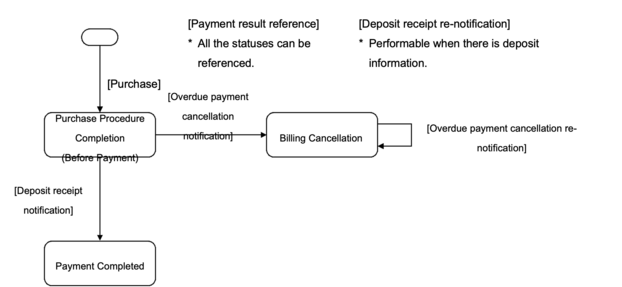
| Provided functions | Link Type Process name/Function ID | API Type Process name/Function ID | Payment management tool Screen name/Button name |
|---|---|---|---|
| Purchase | Purchase Request A01-1 | Payment request ST01-00101-703 or Payment request (Specification of deadline time for payment) ST01-00107-703 | – |
| Payment result reference | – | ※1 | – |
| Deposit notification | Purchase Result CGI A02-1 | Deposit notification NT01-00103-703 | – |
| Overdue payment cancellation notification | Purchase Result CGI A02-1 | Overdue payment cancellation notification NT01-00104-703 | – |
| Deposit receipt re-notification | – | – | Billing Information Screen Deposit information field "Re-notification" |
| Overdue payment cancellation re-notification | – | – | Billing Information Screen Cancel notification field "Re-notification" |
Cautions
About detailed item names
- When using WELLNET
Please note that the Pay-easy Payment Service does not share the representative detail and item detail with the bank system. Please be aware of this.
Choosing a payment method
<<WELLNET>>
When the Pay-easy Payment Service and Web Convenience Store Payment Service have been introduced, the end user can pay with a payment method different from the one during the payment procedure. At this time, the deposit receipt notification, management screen display, and settlement processes are carried out as the payment method during the payment procedure.
<<Densan System>>
Due to the specifications of the service, after selecting Pay-easy as a payment method, convenience store (Seicomart) will be available to select as a payment method on the payment institution's screen. Even when the payment is made through the Convenience Store Payment, it is considered as a payment through the Pay-easy Payment Service, and the deposit receipt notification, management screen display, and settlement processes are carried out as the Pay-easy payment.
Payment methods
Details regarding available ATMs, online banking, etc. depend on each financial institution. Please be aware of this.
Specifications
Note that if the collection or other company makes a change to the specifications or economic requirements, the specifications of the Pay-easy Payment Service provided by SBPS may also change.
Service Suspension Due to Maintenance, etc.
Maintenance of the Online Payment ASP Service is performed on an irregular basis. Any service suspension due to maintenance will be notified in advance. As a rule, such a notification is made 1 week before the suspension. However, this may not be the case in the event of emergency maintenance.
In addition, if a service outage occurs due to system maintenance or a malfunction of a collection company, financial institution, etc. other than SBPS’s system, SBPS will promptly notify the affiliated stores as soon as SBPS become aware of the situation and investigate the cause. Note that although SBPS will report to Merchants as soon as we find out the cause, it may take time to determine the cause if the problem is not attributable to us.
Supplementary Information
No supplementary information available.
