d Payment
d payment refers to the payment methods provided by Docomo FG.
The following methods of payment are available for end users:
<<Payment method (1) - Payment combined with phone charge>>
The method for paying together with the monthly mobile phone charge. The availabilities are as follows.
| Service | One-time charge | Recurring charge (simple) | Recurring charge (based on term or usage rate) |
|---|---|---|---|
| d Payment (Carrier) | ( (DOCOMO line contracting party) | ( (DOCOMO line contracting party) | ( (DOCOMO line contracting party) |
| d Payment (Wallet) | ( (DOCOMO line contracting party) | ( (DOCOMO line contracting party) | ( (DOCOMO line contracting party) |
<<Payment method (2) - Payment from d Payment balance>>
The method for paying from the d Payment balance. The availabilities are as follows.
| Service | One-time charge | Recurring charge (simple) | Recurring charge (based on term or usage rate) |
|---|---|---|---|
| d Payment (Carrier) | ○ | ○ | ○ |
| d Payment (Wallet) | ○ | ○ | ○ |
<<Payment method (3) - Credit card payment>>
The method for paying for items and services using a card number, expiration date, and other pieces of information. The availabilities are as follows.
| Service | One-time charge | Recurring charge (simple) | Recurring charge (based on term or usage rate) |
|---|---|---|---|
| d Payment (Carrier) | × | × | × |
| d Payment (Wallet) | ○ | ○ | ○ |
The following methods of appropriation are available for end users:
<<Appropriation method (1) - d point appropriation>>
The method for paying all or part of the billing amount with the available d points with 1 point being equivalent to 1 JPY when the payment is made through one of the payment methods (1), (2), and (3) described above. The availabilities are as follows.
| Service | One-time charge | Recurring charge (simple) | Recurring charge (based on term or usage rate) |
|---|---|---|---|
| d Payment (Carrier) | ○ | ○ | ○ |
| d Payment (Wallet) | ○ | ○ | ○ |
<<Appropriation method (2) - d Payment balance appropriation>>
The method for deducting all or part of the billing amount from the d Payment balance when the payment is made through either payment method (1) or (3) described above. The availabilities are as follows.
| Service | One-time charge | Recurring charge (simple) | Recurring charge (based on term or usage rate) |
|---|---|---|---|
| d Payment (Carrier) | × | × | ○ |
| d Payment (Wallet) | × | × | ○ |
For more information on d Payment, please refer to the following website. Note that the URL may change.
d Payment
https://service.smt.docomo.ne.jp/keitai_payment/
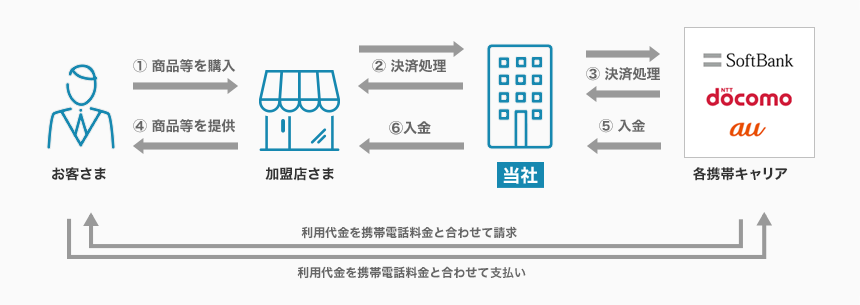
Service Diagram

Main Features
- End users can easily shop using only their DOCOMO ID and password.
- Use fees are billed together with the monthly mobile phone charge, making the payment easy.
- Because Merchants do not need to obtain a credit card number and other personal information, end users can use the service safely and securely.
Usage Information for End Users
Please refer to the service website for details on the purchasing procedure.
For end-user usage information, please refer to the FAQ (Payment /System Specifications > d payment) or the page of each Financial institution.
Service Specifications
Basic Specifications
The available billing systems and billing system-specific basic specifications are as follows. Each period of time for processing settlement, cancellation, and others performed by the payment administration tool is based on the tool.
Billing Methods
| Billing method | Availability | Remarks |
|---|---|---|
| One-time charge | ○ | – |
| Recurring charge (simple) | ○ | – |
| Recurring charge (based on term or usage rate) | ○ | – |
Basic Specifications
| Billing method | Field | Specifications | |
|---|---|---|---|
| One-time charge | Close authorization settlement | Automated sales | ○ |
| Specified sales | ○ | ||
| Period for settlement | Auto close authorization settlement: settlement is not necessary. Specified close authorization settlement: Until 8 p.m. of the end of the month after next including the date of purchase request process. | ||
| Period for cancellation | Auto close authorization settlement: cancellation function not available. Specified close authorization settlement: Until 8 p.m. of the end of the month after next including the date of purchase request process. | ||
| Period for refund | Until 8 p.m. of the end of the month after next including the date of purchase request process. | ||
| Recurring Billing (Simplified) | Close authorization settlement | Automated sales | ○ |
| Specified sales | × | ||
| Recurring billing processing (authorization) | First month: Billing processing is performed by the Merchant. Second month onward: Not necessary. | ||
| Date of settlement process | SBPS automatically bills on the first day of each month. | ||
| Date of notification of billing processing not possible | Returned starting from the second day of each month in order. | ||
| Period for refund | Until 8 p.m. of the end of the month after next including the date of purchase request process. * The money billed in the first month can be refunded from the first second day of the next month of the date of the purchase request process. However, a refund error may occur if the refund process is carried out on the start day depending on the timing of the completion of the billing processing. In such a case, wait for a moment, and then carry out the refund process again. | ||
| Selection function | Whether the first month is charged or not and whether cancellation in the first month is billed or not can be selected as options. | ||
| Recurring charge (based on term or usage rate) | Close authorization settlement | Automated sales | ○※1 |
| Specified sales | ○※2 | ||
| Recurring billing processing (authorization) | The billing processing is performed by the Merchant * SBPS does not perform the billing processing. | ||
| Period for settlement | Auto close authorization settlement: settlement is not necessary. Specified close authorization settlement: Until 8 p.m. of the end of the month after next including the date of purchase request process. | ||
| Date of notification of billing processing not possible | None | ||
| Period for cancellation | Auto close authorization settlement: cancellation function not available. Specified close authorization settlement: Until 8 p.m. of the end of the month after next including the date of purchase request process. | ||
| Period for refund | Until 8 p.m. of the end of the month after the next including the date of purchase request processing or the date of purchase request processing for recurring billing (fixed term/pay as you go). | ||
| Expiration date of the recurring billing from the date of last payment process | The decision will be made by NTT Docomo Financial Group, with a target period of 13 months. | ||
*2: d Payment (carrier) is unavailable. Only d Payment (Wallet) is available.
Supported devices
The available devices are as follows.
| Device | Availability | Remarks |
|---|---|---|
| PC | ○ | – |
| Smartphone | ○ | – |
| Mobile | ○ | – |
List of Provided Functions
The following functions are provided. As for the payment administration tool, only the main functions are listed. For details, see the Payment Administration Tool Manual.
| Billing system/Close authorization settlement | Provided functions | Link Type | API Type | Payment management tool |
|---|---|---|---|---|
| One-time billing/Auto close authorization settlement | Purchase | ○ | – | – |
| Refund | – | ○ | ○ | |
| Partial Refund | – | ○ | ○ | |
| One-time billing/Specified close authorization capture | Purchase | ○ | – | – |
| Settlement | – | ○ | ○ | |
| Partial Settlement | – | ○ | ○ | |
| Cancellation | – | ○ | ○ | |
| Refund | – | ○ | ○ | |
| Partial Refund | – | ○ | ○ | |
| Recurring charge (simple) | Purchase | ○ | – | – |
| Refund | – | ○ | ○ | |
| Partial Refund | – | – | ○ | |
| Cancellation of recurring billing (simplified) | ○ | ○ | ○ | |
| Recurring billing (simplified) cancellation notification | ○ | – | – | |
| Recurring billing (fixed term/pay as you go)/ Auto close authorization settlement For d Payment (Carrier), these are applied. | Purchase | ○ | – | – |
| Refund | – | ○ | ○ | |
| Partial Refund | – | ○ | ○ | |
| Recurring Billing (Fixed Term/Pay as You Go) Request | ○ | – | – | |
| Recurring Billing (Fixed Term/Pay as You Go) Purchase | – | ○ | ○ | |
| Recurring Billing (Fixed Term/Pay as You Go) Unsubscribing | ○*1 | ○*1 | ○*1 | |
| Recurring billing (fixed term/pay as you go)/Specified close authorization settlement For d Payment (Wallet), these are applied. | Purchase | ○ | – | – |
| Settlement | – | ○ | ○ | |
| Refund | – | ○ | ○ | |
| Cancellation | – | ○ | ○ | |
| Recurring Billing (Fixed Term/Pay as You Go) Request | ○ | – | – | |
| Recurring Billing (Fixed Term/Pay as You Go) Purchase | – | ○ | ○ | |
| Recurring Billing (Fixed Term/Pay as You Go) Unsubscribing | ○*1 | ○*1 | ○*1 |
The "recurring billing (fixed term/pay as you go)" for d Payment (Carrier) is the auto close authorization settlement, and that for d Payment (Wallet) is the specified close authorization settlement.
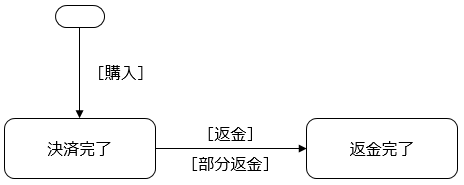
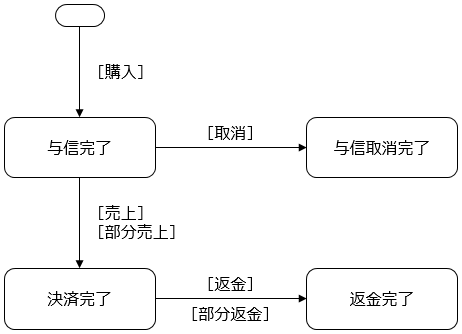
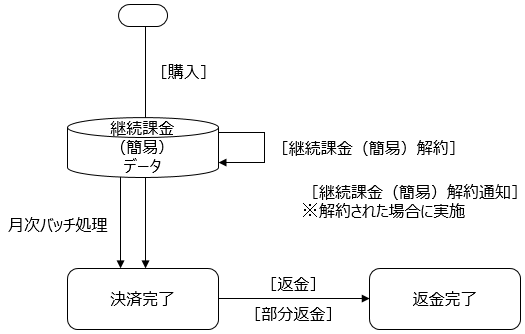
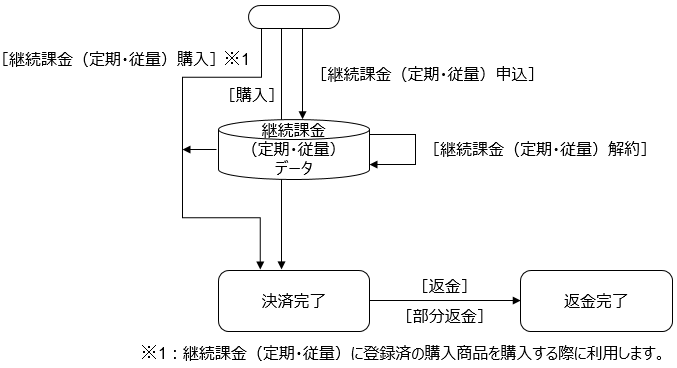
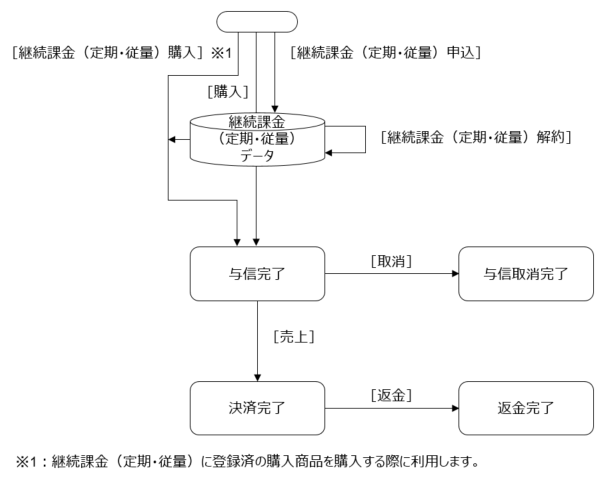
Payment Status Transition
By implementing each of the functions provided, the status of the Payment will Transition as follows. For details on how to implement each function, refer to the Link Type IF specification, the API type IF specification, and the SBPS Admin portal / Payment management tool Function Manual.
<<One-time billing/Auto close authorization settlement >>

| Provided functions | Link Type Process name/Function ID | API Type Process name/Function ID | Payment management tool Screen name/Button name |
|---|---|---|---|
| Purchase | Purchase Request A01-1 | – | – |
| Refund | – | Cancel/Refund Request ST02-00303-401 | Billing Information Screen "Refund" |
| Partial Refund | – | Cancel/Refund Request ST02-00303-401 | Billing Information Screen "Partial refund" |
<<One-time billing/Specified close authorization settlement >>

| Provided functions | Link Type Process name/Function ID | API Type Process name/Function ID | Payment management tool Screen name/Button name |
|---|---|---|---|
| Purchase | Purchase Request A01-1 | – | – |
| Settlement | – | Sales request ST02-00201-401 | Billing Information Screen "Settlement" |
| Partial Settlement | – | Sales request ST02-00201-401 | Billing Information Screen "Partial Settlement" |
| Cancellation | – | Cancel/Refund Request ST02-00303-401 | Billing Information Screen "Cancellation" |
| Refund | – | Cancel/Refund Request ST02-00303-401 | Billing Information Screen "Refund" |
| Partial Refund | – | Cancel/Refund Request ST02-00303-401 | Billing Information Screen "Partial refund" |
<<Recurring billing (simplified)>>

| Provided functions | Link Type Process name/Function ID | API Type Process name/Function ID | Payment management tool Screen name/Button name |
|---|---|---|---|
| Purchase | Purchase Request A01-1 | – | – |
| Refund | – | Cancel/Refund Request ST02-00303-401 | Billing Information Screen "Refund" |
| Partial Refund | – | – | Billing Information Screen "Partial refund" |
| Recurring charge (simple) Cancellation | Purchase Request A01-1 | Recurring charge (simple) Cancellation request ST02-00302-401 | Recurring charge (simple) User Information Screen "Cancel" |
| Recurring charge (simple) Cancellation notification | Purchase Result CGI A02-1 | – | – |
<<Recurring billing (fixed term/pay as you go) through d Payment (Carrier)>>

| Provided functions | Link Type Process name/Function ID | API Type Process name/Function ID | Payment management tool Screen name/Button name |
|---|---|---|---|
| Purchase | Purchase Request A01-1 | – | – |
| Refund | – | Cancel/Refund Request ST02-00303-401 | Billing Information Screen "Refund" |
| Partial Refund | – | Cancel/Refund Request ST02-00303-401 | Billing Information Screen "Partial refund" |
| Recurring Billing (Fixed Term/Pay as You Go) Request | Recurring charge (based on term or usage rate) Application Request D01-1 | – | – |
| Recurring Billing (Fixed Term/Pay as You Go) Purchase | – | Recurring charge (based on term or usage rate) Purchase Request ST01-00104-401 | Recurring charge (based on term or usage rate) User Information Screen "purchase" |
| Recurring Billing (Fixed Term/Pay as You Go) Unsubscribing | Recurring charge (based on term or usage rate) Application Request D01-1 | Recurring charge (based on term or usage rate) Cancellation request ST02-00309-401 | Recurring charge (based on term or usage rate) User Information Screen "Cancellation" |
<<Recurring billing (fixed term/pay as you go) through d Payment (Wallet)>>

| Provided functions | Link Type Process name/Function ID | API Type Process name/Function ID | Payment management tool Screen name/Button name |
|---|---|---|---|
| Purchase | Purchase Request A01-1 | – | – |
| Settlement | Sales request ST02-00201-401 | Billing Information Screen "Settlement" | |
| Refund | – | Cancel/Refund Request ST02-00303-401 | Billing Information Screen "Refund" |
| Cancellation | – | Cancel/Refund Request ST02-00303-401 | Billing Information Screen "Cancellation" |
| Recurring Billing (Fixed Term/Pay as You Go) Request | Recurring charge (based on term or usage rate) Application Request D01-1 | – | – |
| Recurring Billing (Fixed Term/Pay as You Go) Purchase | – | Recurring charge (based on term or usage rate) Purchase Request ST01-00104-401 | Recurring charge (based on term or usage rate) User Information Screen "purchase" |
| Recurring Billing (Fixed Term/Pay as You Go) Unsubscribing | Recurring charge (based on term or usage rate) Application Request D01-1 | Recurring charge (based on term or usage rate) Cancellation request ST02-00309-401 | Recurring charge (based on term or usage rate) User Information Screen "Cancellation" |
Cautions
d Payment (Carrier) and d Payment (Wallet)
A Merchant cannot contract for both d Payment (Carrier) and d-Barai (Wallet) services. A Merchant can contract for only either d Payment (Carrier) or d Payment (Wallet). Note that the release of d Payment (Wallet) is scheduled for October 2022.
Unauthorized Usage Investigations and Chargebacks
If the end user requests Item deficiencies or no record of use, or if there is suspicion of unauthorized use by a third party, Docomo FG may conduct fraud investigations and chargebacks (refusal to purchase claims). If we receive contact from Docomo FG, we will promptly inform merchant of the situation, so please respond according to the information provided. If the chargeback is confirmed, the Settlement amount will not be settled and will be merchant burdened. For details, please refer to the Important Matters Explanation provided at the time of application.
Cautions on Link Type purchase requests for recurring billing (fixed term/pay as you go)
When a Link Type purchase request for the recurring billing (fixed term/pay as you go) is made, the application processing and payment processing are carried out, but in some cases, the billing may fail after the application processing. In such cases, the application processing is canceled and the purchase request itself is canceled. Although an application email is sent to the end user, no money is billed. (The billing error screen is also displayed.) To avoid such cases, make a Link Type recurring billing (fixed term/pay as you go) application request, and then make an API type recurring billing (fixed term/pay as you go) purchase request, rather than the Link Type purchase request.
Test payments in the test environment
All payments made in the test environment are treated as actual production payments. Therefore, after making test payments, be sure to cancel the payments and registrations. If they are not canceled, they are handled as the targets of settlement and payment fees are charged.
Specifications
d payment provides services provided by Docomo FG into the Online Payment ASP Service. If Docomo FG makes changes to specifications or economic conditions, the specifications of the d payment provided by our company may also be changed accordingly.
Service Suspension Due to Maintenance, etc.
Maintenance of the Online Payment ASP Service is performed on an irregular basis. Any service suspension due to maintenance will be notified in advance. As a rule, such a notification is made 1 week before the suspension. However, this may not be the case in the event of emergency maintenance.
Furthermore, if service interruptions occur due to system maintenance or malfunctions at Docomo FG or Docomo FG partners outside our own systems, we will promptly notify the merchant as soon as the situation becomes clear and investigate the cause. Once the cause is identified, we will notify the merchant, but please understand in advance that if the cause is not attributable to us, it may take some time to determine the cause.