

 Content of this page
Introduction
AI fraud detection management tool is a management tool that allows you to search and refer to the results of scores and rule judgments, and to create and simulate the rules necessary for setting up rule judgments.
[Major features]
– Search/reference scores and rule judgment results and output in CSV format
– Creating rules necessary for rule determination
– Simulation of rules for past Payment
- Register for block or allow list
– Search/reference of the operation history performed and CSV output
[Notes]
The operations will vary depending on the logged-in user's authority and contract plan.
| For detailed information on the functions and operation of the AI fraud detection management tool, please download the manual below. AI fraud detection Management Tools Manual |
About the Dashboard
After logging in, you will see the following dashboard.
The dashboard is divided into three areas.
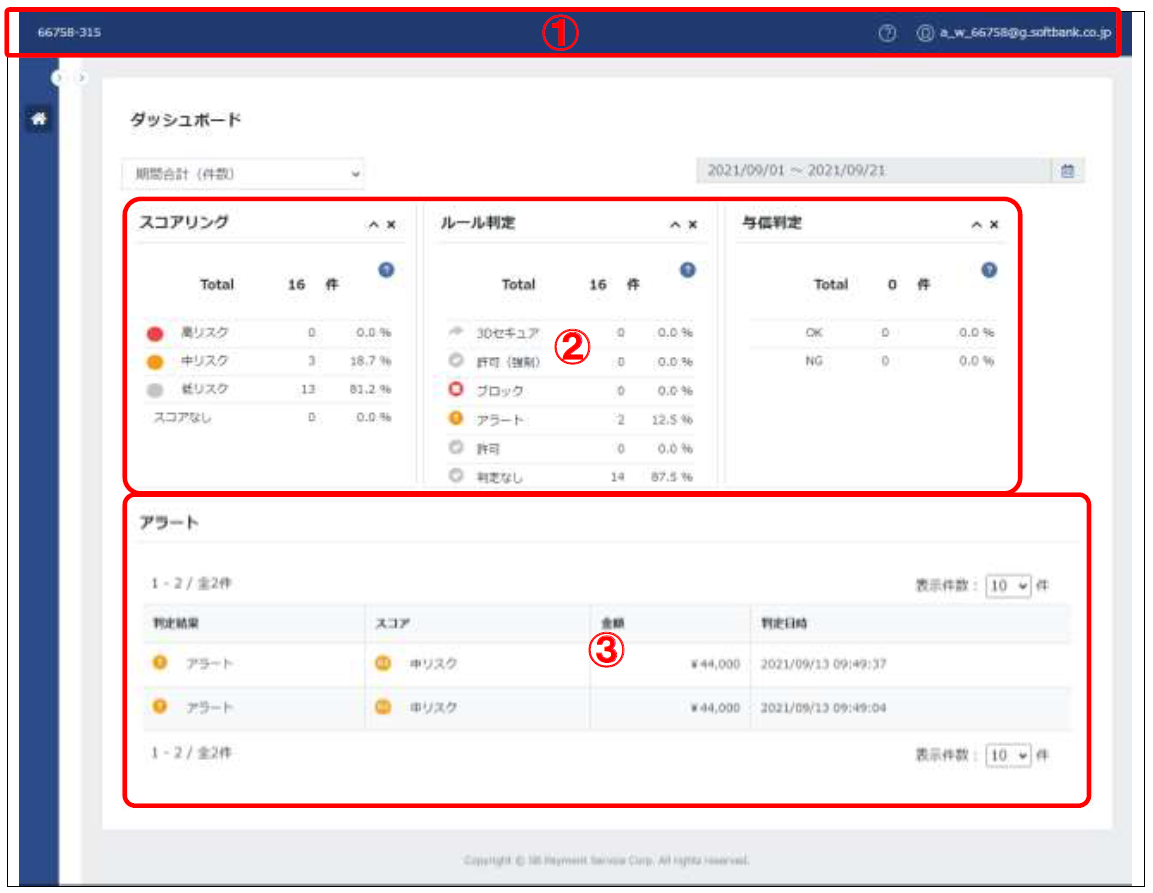
| ①MSID, user ID | Displays the MSID accessed in the upper left corner of the screen and the user ID accessed in the upper right corner of the screen. |
| ② Panel | The three results of "scoring," "rule judgment," and "Authorization judgment" are displayed in a table aggregated by number of items or amount. In addition, the results of "rule judgment" are displayed in a time series graph by number of cases or amount. *Data will be collected for the period specified on the calendar. *By default, data on the date of access is displayed. *The default is to display "Total number of items for the period." |
| ③Alert | Displays a list of Payment that are subject to the alert. Double-clicking on the data Transition to the individual record screen for that Payment. *Data for the period specified on the calendar will be displayed. *By default, data on the date of access is displayed. |
panel
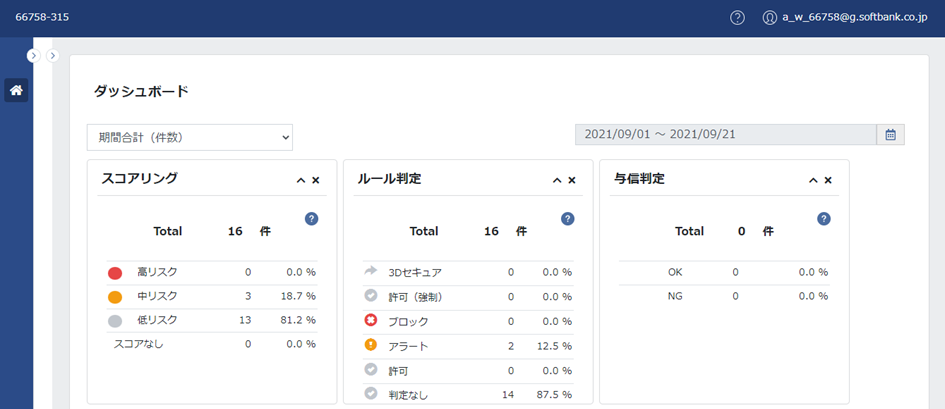
The panel displays the summary results for the period specified on the calendar in a table or graph.
Alerts
Alerts allow you to view a list of Payment that have triggered an alert during a specified period.
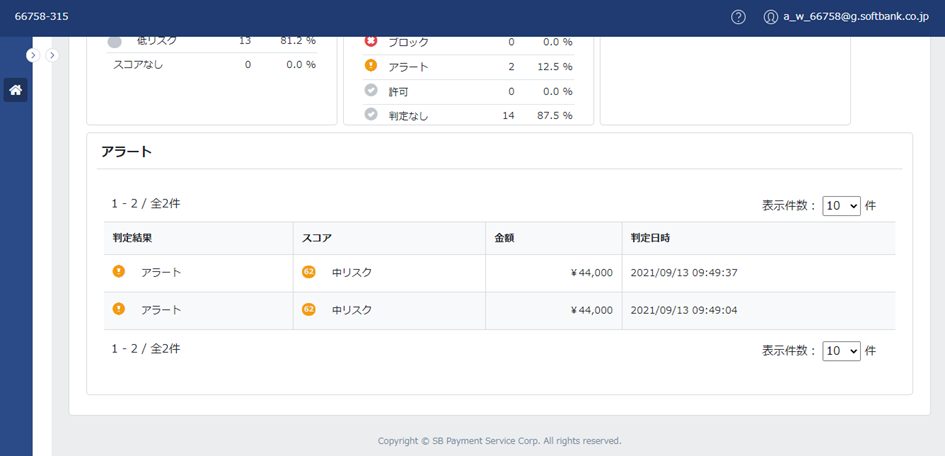
The items displayed in the list are as follows.
| Field name | Description |
|---|---|
| Judgment result | Shows the result of rule judgment. * Payment that are subject to the alert during the specified period will be displayed. |
| Score | Shows score and score level. |
| Amount of money | Shows the Payment amount. |
| Judgment date | Displays the judgement date. |
[Notes]
If there are no Payment that met the alert during the specified period, 0 will be displayed.
About the results
The result confirmation is used when performing the following processes:
– Display scores and rule judgment results in a list and output them in CSV format
– Confirmation of individual slips
- Add operational notes
– Feedback as suspicious transaction
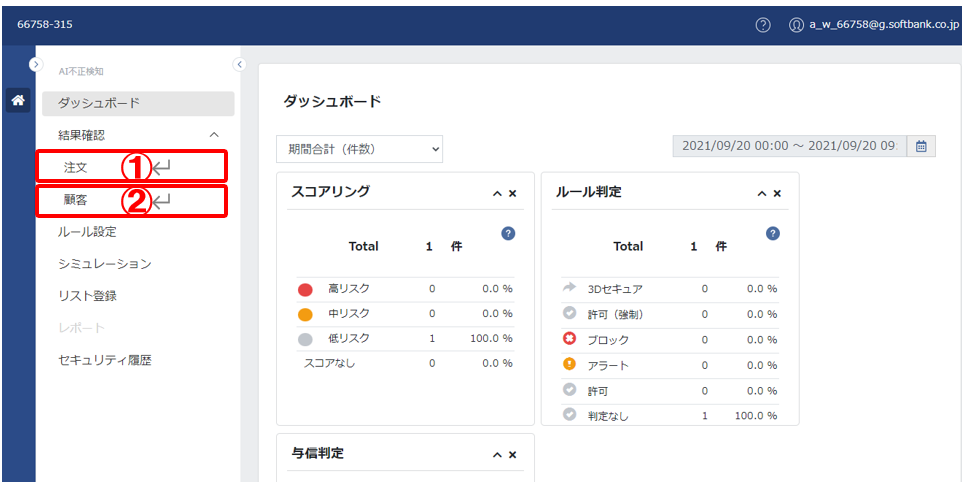
| ① Order | Displayed by Payment unit. |
| ②Customers | Displayed by customer ID. |
Order
For orders, you can check the scores and rule judgment results on a Payment basis.
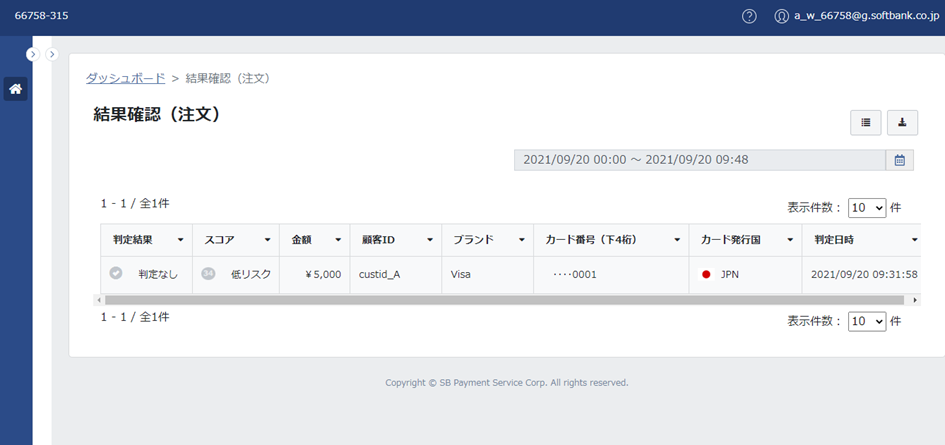
The items displayed in the list are as follows.
Basic items:
| Field name | Description | Default display |
|---|---|---|
| Fraud Scoring ID | ID issued by our company at the time of scoring | × |
| Tracking ID | ID issued by our company at the time of purchase | × |
| Purchase ID | A purchase ID managed by the merchant | × |
| Judgment result | Show rule decision result Rule decision type: ・ "3-D Secure" ・"Allow (Force)" ·"block" ・"Alert" ·"permission" ・"No Judgment": This is displayed when no rule applies. *An icon will be displayed according to the rule judgment. 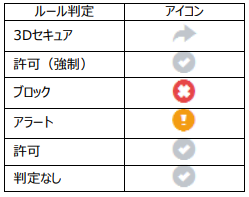 | 〇 |
| Score | Show scores and score levels Score range: 0-99 *The score is calculated based on similarity to past fraudulent transactions. *The higher the number, the higher the risk of the transaction. *The background color of the numbers will change depending on the score level. "High risk": Red "Medium risk": Yellow "Low risk": Gray *Score levels are classified by SBPS according to the following thresholds based on the score results. "High Risk": 86-99 "Medium risk": 60-85 "Low Risk": 0-59 [Notes] ・If "Skip Subsequent" is selected in the rule settings, Or, if the AI fraud detection was not scored for any reason, it will be displayed blank. | 〇 |
| Amount of money | Amount of charge with tax included | 〇 |
| Authorization results | Display the results of Authorization decisions Types of Authorization decision: ·"OK" ・"NG" | × |
| 3D Authentication | Display the 3D authentication result 3D authentication types: <When using EMV 3-D Secure> ・"OK": The card company supports EMV 3-D Secure and EMV 3-D Secure authentication was successful ・"NG": The card company supports EMV 3-D Secure, but EMV 3-D Secure authentication failed. ・ "Not authenticated": The card company supports EMV 3-D Secure but is frictionless, Or, the card company does not support EMV 3-D Secure, Or, the card company supports EMV 3-D Secure, but the user has not registered ID verification service <If you use 3-D Secure > ・ "OK": The card company supports 3-D Secure and 3-D Secure authentication is successful ・ "NG": The card company supports 3-D Secure, but 3-D Secure authentication fails ・ "Unauthenticated": The card company does not support 3-D Secure, Or, the card company supports 3-D Secure, but the user is not registered ID verification service. *Displays when using EMV 3-D Secure (or 3-D Secure). | × |
| Reason of Error | Reason of Error *Displays if the Authorization result is NG. *For details on the error reasons, please refer to the list of error reasons. [Notes] The code listed in the error reason is updated from time to time, so it may not be up to date. If an error reason not listed is displayed, please contact SBPS Merchant Support. | × |
| Customer ID | A customer ID managed by the merchant | 〇 |
| Brand | Shows card brand. Card brand type: ・Visa ・Mastercard ・"JCB" ・AMEX ・"Diners" ・"Discover" ・"China UnionPay" *If the card brand is unknown, the field will be left blank. | 〇 |
| Card number (last 4 digits) | Card number (only the last 4 digits are displayed) | 〇 |
| Card number (HASH) | Card number (converted into Hash (Encryption) value by our company) | × |
| Card issuing country | Shows the country of card issue. The country of issue of the card is displayed as the country code (3 digits) and the country flag. *If the card issuing country is unknown, this will be left blank. *For details on country codes, please refer to the "Items that can be used in the Rules" in the attached document, which will be provided by our company in a specified manner. Please refer to "Card issuing country". [Notes] This will be displayed if the card brand is Visa or Mastercard. | 〇 |
| browser | Shows the User Agent. | × |
| language | Displays the browser language obtained from our JavaScript. | × |
| Time spent on Credit card information entry page | Displays the time spent on Credit card information input page obtained from our JavaScript. | × |
| Page information before entering Credit card information | Displays page information before entering Credit card information obtained from our JavaScript. | × |
| IP Address | Displays the IP address obtained from our JavaScript. | × |
| IP Address (Country) | Show IP address country. The IP address will display the country code (2 digits) and the country flag. *If the IP address (country) is unknown, it will be displayed blank. *For details on country codes, please refer to the "Items that can be used in the Rules" in the attached document, which will be provided by our company in a specified manner. See "IP Address (Country)". [Notes] The IP address (country) will be displayed based on the IP address obtained. However, this does not guarantee accuracy. | × |
| Product ID | A product ID managed by the merchant | × |
| Item name | Optional product name that can be set by merchant | × |
| Number of Item | Optional number of Item that can be set by merchant | × |
| Item Category | Optional Item category that can be set by merchant | × |
| Campaign Code | Optional campaign code that can be set by merchant | × |
| Free field | Optional free field that can be set in merchant | × |
| Judgment result | Transactions that have been given feedback as suspicious are marked as "Suspicious Transaction." | × |
| Judgment date | The date and time the scoring was performed | 〇 |
[Notes]
- The list can display up to 10,000 items.
- If the number of results exceeds 10,000, an error will be displayed. Please narrow down the specified period on the calendar or set filters for the items and search again.
client
Customers can check the scores and rule judgment results on a customer-by-customer basis.
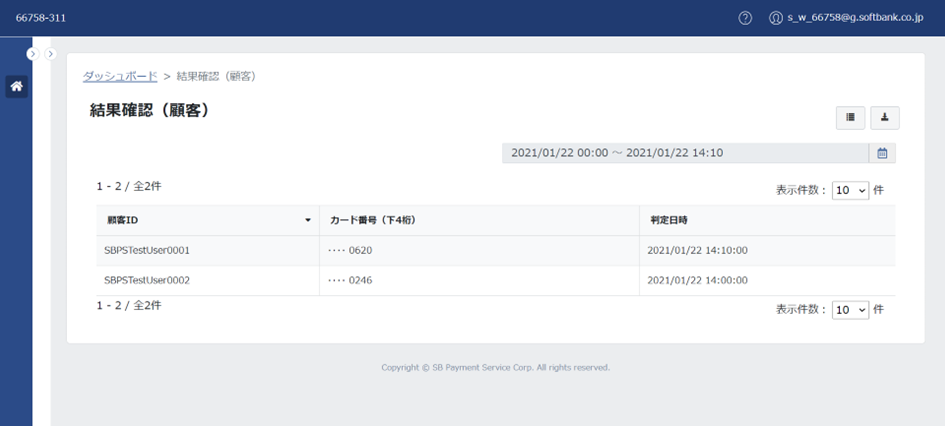
List
The items displayed in the list are as follows.
Basic items:
| Field name | Description | Default display |
|---|---|---|
| Customer ID | Customer ID for Payment made during the calendar period | 〇 |
| Amount of money | Total amount per customer ID for Payment made during the period specified in the calendar | × |
| Card number (last 4 digits) | The most recent card number for Payment made during the calendar period (Only the last four digits are displayed) | 〇 |
| Card number (HASH) | The most recent card number for Payment made during the calendar period (Value converted into Hash (Encryption) by our company) | × |
| Card issuing country | Displays the most recent card issuing country for Payment made during the calendar period. The country of issue of the card is displayed as the country code (3 digits) and the country flag. *Displays if the card brand is Visa or Mastercard. *If the card issuing country is unknown, this will be left blank. *For details on country codes, please refer to the country code list. | × |
| Judgment date | The date and time of the most recent scoring of Payment made during the calendar period | 〇 |
*The functions for sorting data, setting filters, changing the sort order of items, and outputting to CSV are the same as those for "Orders." For details, please refer to "Orders."
*This chapter describes how to change items (add/delete items).
[Notes]
- A list of up to 1,000 customer IDs can be displayed.
- If the number of results exceeds 1,000, an error will be displayed. Please narrow down the calendar period or customer ID and search again.
| For detailed information on the dashboard's functions and operation methods, as well as the scores and rule judgment results, please download the manual from the link below. AI fraud detection Management Tools Manual |
