What is Amazon Pay?
Amazon Pay is a service that allows you to make Payment using the address information and payment method registered in your Amazon account.
You can use your registered Amazon account to enjoy shopping outside of Amazon, eliminating the need for tedious Membership registration or entering Payment information.
For more information about Amazon Pay, please see the following website. The URL may be subject to change.
Amazon Pay
https://pay.amazon.co.jp/
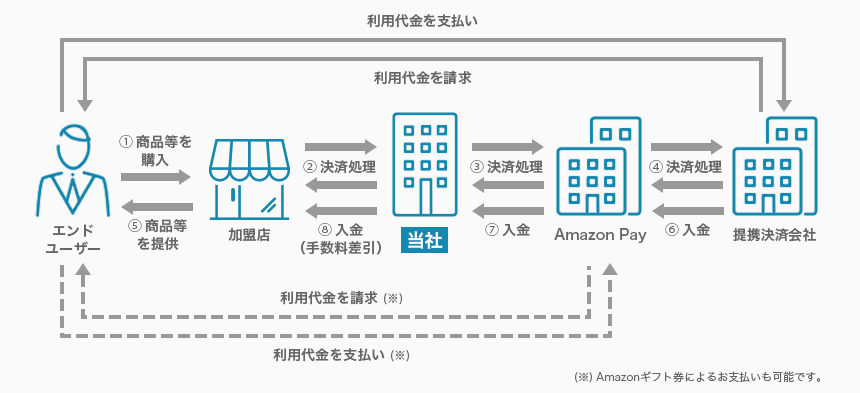
Service Diagram

Main Features
- You can make Payment if you have an Amazon account.
- It can be used on any device, at home or outside.
About issuing seller accounts for merchant
To implement Amazon Pay, you will need to issue a seller account and submit an application to our company.
For more details, please refer to the "Notes" section.
End-user Instructions
Please refer to the service website for details on the purchasing procedure.
For end-user usage information, please refer to the FAQ (Payment /System Specifications > Amazon Pay) or the page of each Financial institution.
Service Specifications
Basic Specifications
The available billing systems and billing system-specific basic specifications are as follows. Each period of time for processing settlement, cancellation, and others performed by the payment administration tool is based on the tool.
Billing Methods
| One-time charge | ○ |
|---|---|
| Recurring charge (simple) | × |
| Recurring charge (based on term or usage rate) | ○ |
Basic Specifications
| Billing method | Field | Specifications | |
|---|---|---|---|
| One-time charge | Close authorization settlement | Automated sales | ○ |
| Specified sales | ○ | ||
| Period for settlement | Auto close authorization settlement: settlement is not necessary. For designated Settlement: Up to 30 days after the "Session Update" processing date and time | ||
| Period for cancellation | Auto close authorization settlement: cancellation function not available. For designated Settlement: Up to 30 days after the "Session Update" processing date and time | ||
| Period for refund | No limitation | ||
| Recurring billing (Periodic, pay-as-you-go) | Close authorization settlement | Automated sales | × |
| Specified sales | 〇 | ||
| Recurring billing process | The billing processing is performed by the Merchant * SBPS does not perform the billing processing. | ||
| Period for settlement | First time: In 30 days after the "Session Update" processing date and time After the second time: In 30 days after the processing date and time of the billing (fixed term/pay-as-you-go) purchase request. | ||
| Period for cancellation | First time: In 30 days after the "Session Update" processing date and time After the second time: In 30 days after the processing date and time of the billing (fixed term/pay-as-you-go) purchase request. | ||
| Period for refund | No limitation | ||
Supported devices
The available devices are as follows.
| Device | Availability | Remarks |
|---|---|---|
| PC | ○ | – |
| Smartphone | ○ | – |
| Mobile | × | – |
List of Provided Functions
The following functions are provided. As for the payment administration tool, only the main functions are listed. For details, see the Payment Administration Tool Manual.
| Billing methods/ Close authorization settlement | Provided functions | Link Type | API Type | Payment management tool |
|---|---|---|---|---|
| One-time billing/Auto close authorization settlement | Acquisition of address and payment information | – | ○ | – |
| Order | – | ○ | – | |
| Session Update | – | ○ | – | |
| Refund (including partial Refund)※1 | – | ○ | ○ | |
| One-time billing/Specified close authorization capture | Acquisition of address and payment information | – | ○ | – |
| Order | – | ○ | – | |
| Session Update | – | ○ | – | |
| Settlement (including partial Settlement)※2※3 | – | ○ | ○ | |
| Cancellation | – | ○ | ○ | |
| Refund (including partial Refund)※1 | – | ○ | ○ | |
| Recurring charge (based on term or usage rate) | Acquisition of address and payment information | – | ○ | – |
| Order | – | ○ | – | |
| Session Update | – | ○ | – | |
| Settlement (including partial Settlement)※2※3 | – | ○ | ○ | |
| Cancellation | – | ○ | ○ | |
| Refund (including partial Refund)※1 | – | ○ | ○ | |
| Recurring Billing (Fixed Term/Pay as You Go) Purchase | – | ○ | ○ | |
| Recurring Billing (Fixed Term/Pay as You Go) Unsubscribing | – | ○ | ○ |
*2: If more than 7 days have passed since the "Session Update", the final result will be notified with a delay due to asynchronous processing.
*3: Partial Settlement can only be made once.
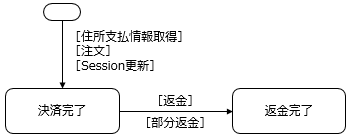
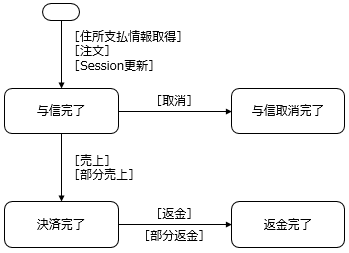
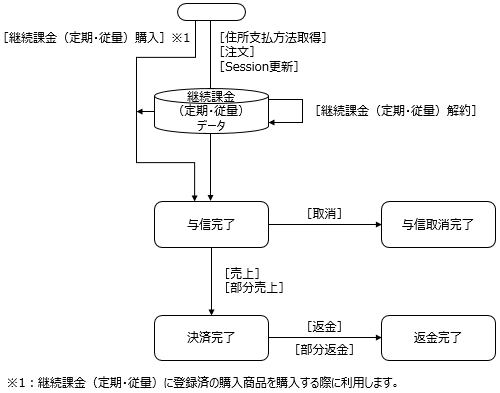
Payment Status Transition
By implementing each of the functions provided, the status of the Payment will Transition as shown below. For details on how to implement each function, refer to the Link Type IF specification, the API type IF specification, and the "SBPS Payment Admin portal / Payment management tool Function Manual."
<<One-time billing/Auto close authorization settlement >>

| Provided functions | Link Type Process name/Function ID | API Type Process name/Function ID | Payment management tool Screen name/Button name |
|---|---|---|---|
| Acquisition of address and payment information | – | Address Payment Method Reference Request MG04-00101-315 | – |
| Order | – | Order Request MG04-00102-315 | – |
| Session Update | – | Session Update request ST01-00101-315 | – |
| Refund | – | Cancel/Refund Request ST02-00303-315 | Billing Information Screen "Refund" |
| Partial Refund | – | Cancel/Refund Request ST02-00303-315 | Billing Information Screen "Partial refund" |
<<One-time billing/Specified close authorization settlement >>

| Provided functions | Link Type Process name/Function ID | API Type Process name/Function ID | Payment management tool Screen name/Button name |
|---|---|---|---|
| Acquisition of address and payment information | – | Address Payment Method Reference Request MG04-00101-315 | – |
| Order | – | Order Request MG04-00102-315 | – |
| Session Update | – | Session Update request ST01-00101-315 | – |
| Settlement | – | Sales request ST02-00201-315 | Billing Information Screen "Settlement" |
| Partial Settlement | – | Sales request ST02-00201-315 | Billing Information Screen "Settlement"※1 |
| Cancellation | – | Cancel/Refund Request ST02-00303-315 | Billing Information Screen "Cancellation" |
| Refund | – | Cancel/Refund Request ST02-00303-315 | Billing Information Screen "Refund" |
| Partial Refund | – | Cancel/Refund Request ST02-00303-315 | Billing Information Screen "Partial refund" |
<<Recurring billing (fixed term/pay as you go)>>

| Provided functions | Link Type Process name/Function ID | API Type Process name/Function ID | Payment management tool Screen name/Button name |
|---|---|---|---|
| Acquisition of address and payment information | – | Address Payment Method Reference Request MG04-00101-315 | – |
| Order | – | Order Request MG04-00102-315 | – |
| Session Update | – | Session Update request ST01-00101-315 | – |
| Settlement | – | Sales request ST02-00201-315 | Billing Information Screen "Settlement" |
| Partial Settlement | – | Sales request ST02-00201-315 | Billing Information Screen "Settlement"※1 |
| Cancellation | – | Cancel/Refund Request ST02-00303-315 | Billing Information Screen "Cancellation" |
| Refund | – | Cancel/Refund Request ST02-00303-315 | Billing Information Screen "Refund" |
| Partial Refund | – | Cancel/Refund Request ST02-00303-315 | Billing Information Screen "Partial refund" |
| Recurring Billing (Fixed Term/Pay as You Go) Purchase | – | Recurring charge (based on term or usage rate) Purchase Request ST01-00104-315 | Recurring charge (based on term or usage rate) User Information Screen "purchase" |
| Recurring Billing (Fixed Term/Pay as You Go) Unsubscribing | – | Recurring charge (based on term or usage rate) Cancellation request ST02-00309-315 | Recurring charge (based on term or usage rate) User Information Screen "Cancellation" |
Cautions
About the application
To use Amazon Pay, you will need to apply to Amazon before applying to our company.
*For detailed application procedures, please refer to the "Application Guide" provided by our company.
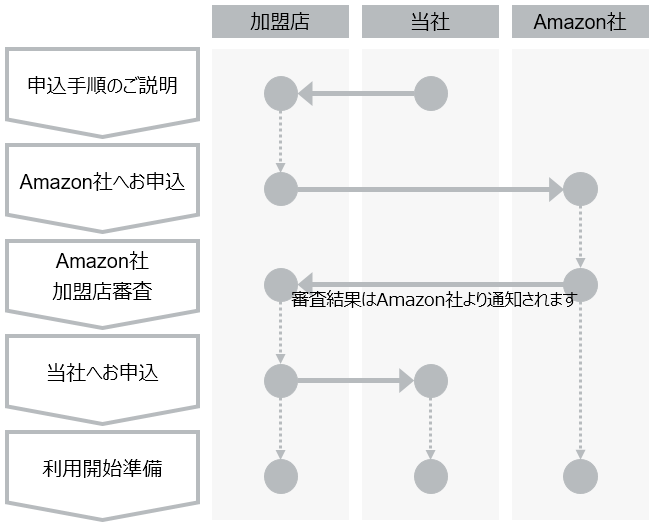
《Amazon Pay application process》

| Step No. | Steps | Supplement |
|---|---|---|
| 1 | Explanation of application procedures | We will guide you through the application procedure. We will provide you with the "Application Guide". |
| 2 | Apply to Amazon | Please apply for Amazon Pay through a dedicated application website provided by our company. |
| 3 | Amazon vetting | Once your application is received, Amazon will carry out Review. The results of Review will be notified directly to merchant by Amazon. |
| 4 | Apply to our company | After Amazon's Review approval, please apply to us. |
| 5 | Preparation start | Before start, please make sure that you have completed the steps we have requested of you at merchant, such as creating the Amazon Pay button. *Please refer to the "Application Guide" for details. |
About the application guide
We will distribute to our merchant individually an "Application Guide" which contains details of the application procedure and matters that should be handled by affiliated merchant.
If you are already using our services, please contact our sales department. If you are using our services for the first time, please contact us by clicking on "Contact Us Now" at the URL below.
https://www.sbpayment.jp/service/asp/amazonpay/
About Seller Central
Seller Central is an administration screen provided by Amazon for merchant. It will be provided by Amazon when you apply to Amazon to use Amazon Pay.
If you have any questions about Seller Central other than the operating instructions provided by our company in various documents, please contact Amazon.
For details, please refer to the URL below.
https://pay.amazon.co.jp/help/201212210
In addition, among the functions of Seller Central, orders (transaction management) must be executed from the management screen "Admin portal / Payment management tool" provided by the Company.
* Please be sure to operate the following operations from the "Admin portal / Payment management tool" screen provided by our company, not from Seller Central.
- Settlement Invoicing
- Cancellation
- Refund
What is Recurring billing(fixed term/pay-as-you-go) used for?
Please note that Recurring billing(fixed term/pay-as-you-go) is only available for "designated Settlement" of the Settlement methods, and "Auto Close Authorization Capture" is not available.
Recurring billing(fixed term/pay-as-you-go) Unit of Cancellation
Recurring billing will be canceled at the time of subscription. Buyers can cancel future Recurring billing with Amazon Pay from the Amazon Pay usage history page.
Regarding the cancellation of services provided by merchant, please follow the terms and conditions of merchant.
A service that supports only the system connection method "API type"
Amazon Pay provides only "API type" among the system connection methods provided by our company, and we do not provide "Link Type".
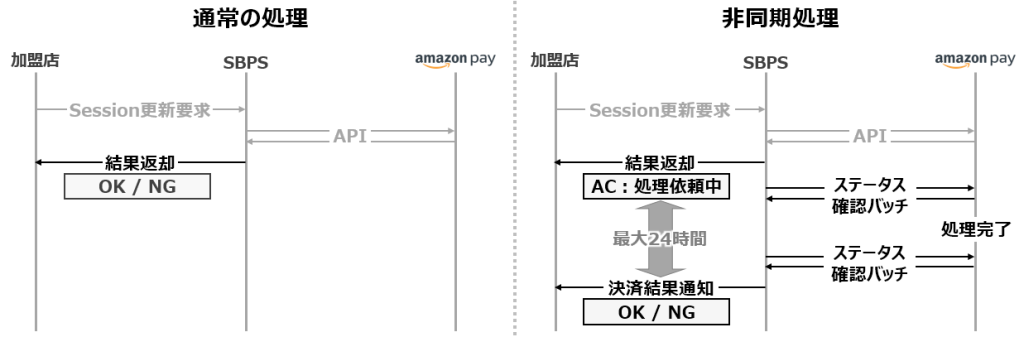
Asynchronous processing
Among the APIs, the following processes are asynchronous.
- Settlement request that has been in effect for 7 days since the session Update request (Authorization) was made
- Refund processing for cancellation Refund requests
In response to the above processing request, we will return the response "AC: Request processing in progress". After that, as soon as we have confirmed that each process has been completed, we will notify you of the final processing status in the "Payment Result Notification".

About the End-User Dispute Program (Amazon A-to-z Guarantee) and Chargeback Filing
The Amazon Marketplace Guarantee provides users with the opportunity to receive a full Refund of the purchase price or cancel the payment they have approved if they are not satisfied with the purchase they made on merchant website using Amazon Pay. Please refer to the following URL for the conditions under which users can apply for the Amazon Marketplace Guarantee in transactions using Amazon Pay and merchant obligations regarding the application.
https://pay.amazon.co.jp/help/201212410
A chargeback is when a user files a dispute with their bank or credit card company (without going through Amazon) and a payment is invalidated by the bank or credit card company. If a user files a chargeback with their bank or credit card company for a purchase made on merchant website using Amazon Pay, the bank or credit card company will notify Amazon.
When Amazon receives a chargeback request, it will send merchant an email with details of the chargeback request, including the order number and the amount involved.
merchant can accept the chargeback or ask Amazon for assistance in disputing the chargeback request. For more information on disputing and responding to a chargeback request, please see the following URL:
https://pay.amazon.co.jp/help/201749650
https://pay.amazon.co.jp/help/201749690?ld=APJPLPADirect
Specifications
Amazon Pay is a service provided by Amazon that is integrated into Online Payment ASP Service. If Amazon makes any changes to its specifications or economic terms, please note that the specifications of the Amazon Pay service provided by our company may also change accordingly.
Service Suspension Due to Maintenance, etc.
Maintenance of the Online Payment ASP Service is performed on an irregular basis. Any service suspension due to maintenance will be notified in advance. As a rule, such a notification is made 1 week before the suspension. However, this may not be the case in the event of emergency maintenance.
In addition, if a service outage occurs due to system maintenance or a malfunction caused by Amazon or its affiliates other than our system, we will notify merchant as soon as we become aware of the situation and investigate the cause. We will notify our merchant as soon as we have identified the cause, but please note that if the cause is not attributable to our company, it may take some time to identify the cause.
Fault and maintenance notifications
With Amazon Pay, Amazon will notify merchant of information regarding failures and maintenance caused by Amazon. For details on notifications regarding failures and maintenance caused by Amazon, please contact Amazon.
In addition, we will notify our merchant of any information regarding malfunctions or maintenance caused by our company.
Supplementary Information
Differences in flows depending on whether or not you need to use "Address Information"
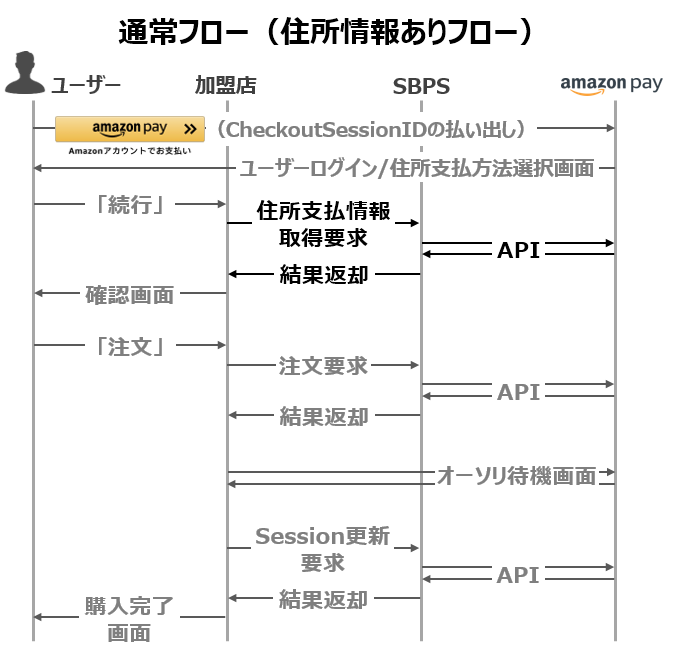
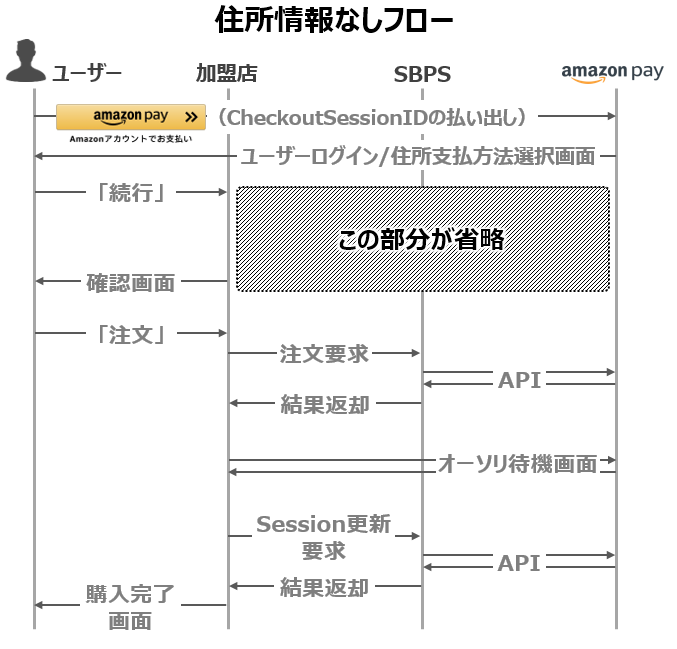
With Amazon Pay, you can use two different API flows: one that uses address information linked to the buyer's Amazon account in cases where delivery is involved, and one that does not.
[Address information available]
This can be used when you need the purchaser's address information, such as for Item that require shipping.
After the buyer logs in using their own Amazon account using the Amazon Pay button, the address information linked to the buyer's Amazon account will be displayed on the "Address Payment Selection Screen" (a screen provided by Amazon).
merchant can obtain the address information selected by the buyer by calling the "Address and Payment Information Acquisition Request API."
In the Amazon Pay button generation tool "Signature Generator", select "PayAndShip" in the "Product Type" setting.
《No address information》
This can be used in cases where the purchaser's address information is not required, such as for Item that do not require shipping.
After the buyer logs in using their own Amazon account using the Amazon Pay button, the "Payment Selection Screen" (a screen provided by Amazon) will be displayed, and only the payment information associated with the buyer's Amazon account will be displayed.
In the Amazon Pay button generation tool "Signature Generator", select "PayOnly" in the "Product Type" setting.
Usage procedure including screen and API
The "Usage Procedures for End Users" section describes Screen transition, but below we will post the expected flow including the API.
《Address information available (ProductType: PayAndShip)》

《No address information (ProductType: PayOnly)》

<Connection with Amazon's system>
System Cooperation between merchant and Amazon will be required from pressing the Amazon Pay button to the login screen, (address) payment method selection screen, and purchase details display screen. Please contact Amazon as necessary to implement the integration.
Unavailable features
Please note that we do not offer the following functions among those offered by Amazon.
List of unavailable features
| Function | Reference URL |
|---|---|
| Amount change - Increase | https://www.amazonpay-faq.jp/faq/QA-12 |
| Re-obtained authorization | https://www.amazonpay-faq.jp/faq/QA-13 |
| Settlement Installment payment | https://www.amazonpay-faq.jp/faq/QA-49 |
| Reporting | https://www.amazonpay-faq.jp/faq/QA-394 |
| Instant Payment Notifications | https://www.amazonpay-faq.jp/faq/QA-116 |
| Social Login | https://www.amazonpay-faq.jp/faq/QA-50 |