このページの内容
シーケンス
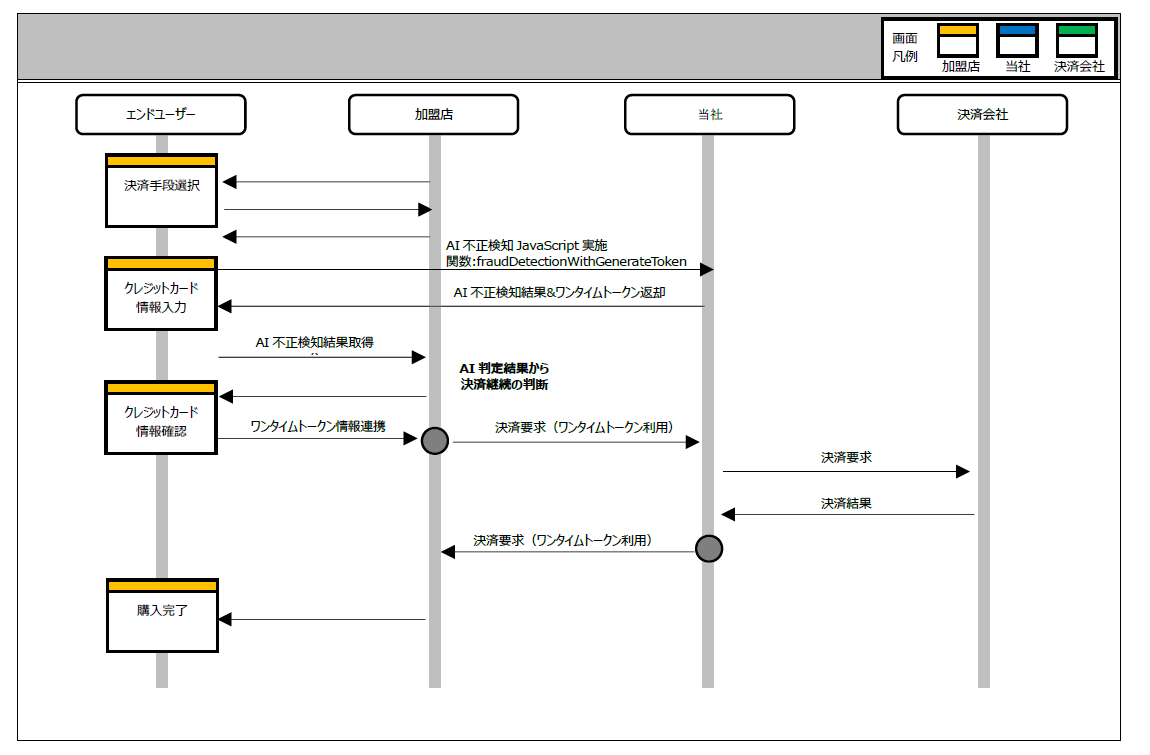
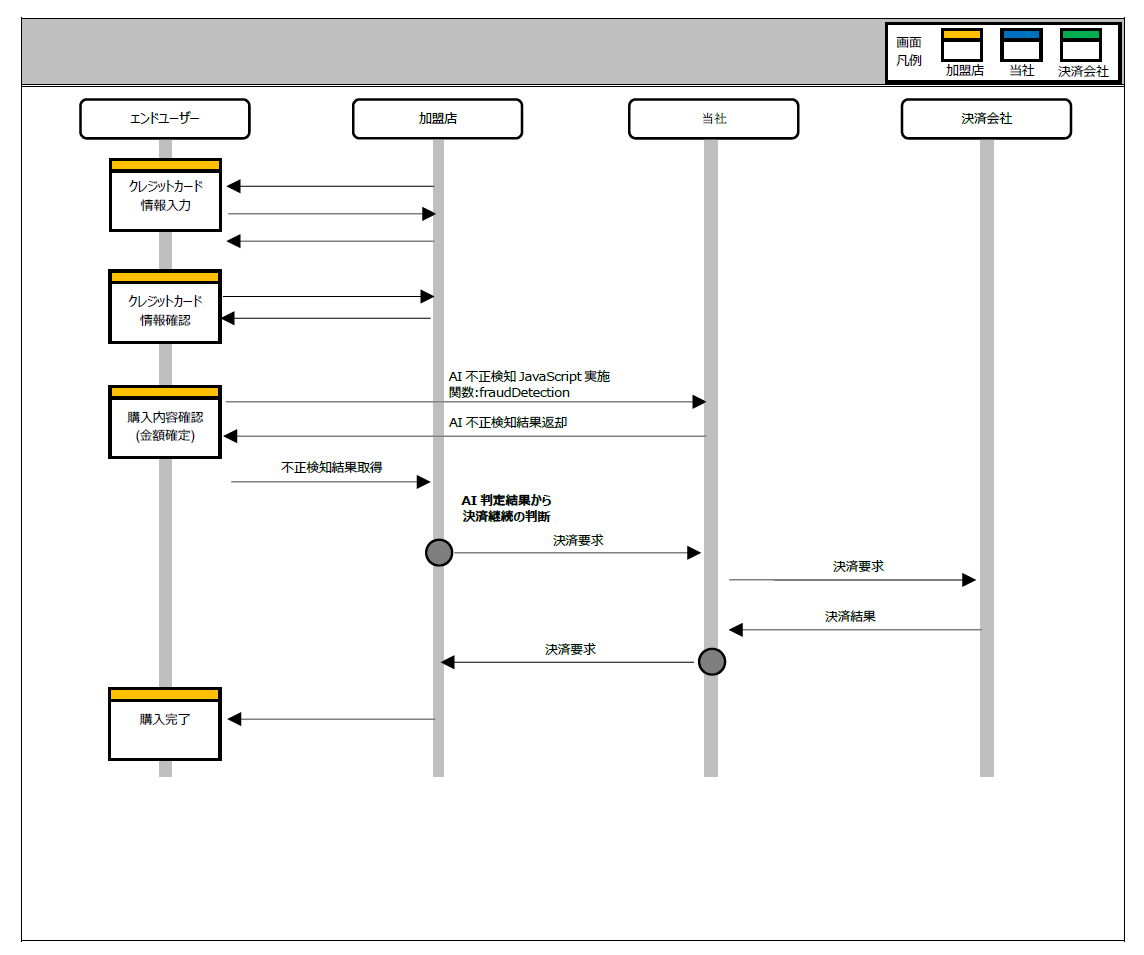
AI 不正検知は決済要求 API の前に実施し、決済要求 API の流れは、以下のとおりです。不正検知判定後の決済の流れの詳細については、API型 基本仕様 を参照ください。
ワンタイムトークン発行時に AI 不正検知を実施する場合
クレジットカード情報を入力する画面へ AI 不正検知 JavaScript を導入することで不正検知が可能となります。
金額確定時に AI 不正検知を実施する場合
ワンタイムトークン発行していない場合やトークン発行後、金額変更している場合については、購入内容確認画面に AI 不正検知 JavaScript を導入することで不正検知が可能となります。
インターフェース
AI 不正検知 システムのインターフェースは以下のとおりです。なお、フォーマットは API 型と同様の XML フォーマットを使用します。詳しくは、API型 基本仕様 を参照ください。
ワンタイムトークン発行時に AI 不正検知を実施する場合
| ファイル | com_sbps_system_fraudv2.js |
|---|
| 関数名 | com_sbps_system_fraud.fraudDetectionWithGenerateToken |
|---|
リクエスト
≪型について≫9:数値型(1Byte の0~9)、X:半角文字列、M:マルチバイト文字列
| No | タグエレメント名 | 項目名 | 桁数 | 型 | 必須 | タイプ | 設定内容 | 備考 |
|---|
| 1 | fraudData | – | – | – | – | – | | 不正検知及びワンタイムトークン発行に関するオブジェクト |
| 2 | merchantId | マーチャント ID | 5 | X | ○ | 固定 | 加盟店を識別する ID | 当社で指定 |
| 3 | serviceId | サービス ID | 3 | X | ○ | 固定 | 加盟店のサービスを識別するID | 当社で指定 |
| 4 | ccNumber | クレジットカード番号 | 16 | X | ○ | 可変 | 0~9999999999999999(ハイフンはなし) | |
| 5 | ccExpiration | 有効期限 | 6 | X | ○ | 固定 | YYYYMM | |
| 6 | securityCode | セキュリティコード | 4 | X | | 可変 | クレジットカードのセキュリティコード | 3 又は 4 桁の数字で設定 |
| 7 | custCode | 顧客 ID | 64 | X | ○ | 可変 | 加盟店にて管理されている顧客 ID | マーチャント、サービス単位でユニーク(一意)のもの |
| 8 | orderId | 購入 ID | 38 | X | | 可変 | 加盟店にて管理されている購入 ID | マーチャント、サービス単位でユニーク(一意)のもの |
| 9 | amount | 金額(税込) | 8 | 9 | ○ | 可変 | 税込の課金金額 | |
| 10 | itemId | 商品 ID | 32 | X | ○ | 可変 | 加盟店にて管理されている商品 ID | ルールで利用しない場合は任意の固定値を設してください |
| 11 | itemName | 商品名称 | 40 | M | | 可変 | 任意の商品名 | ルールで利用しない場合は任意の固定値を設してください |
| 12 | itemCount | 商品点数 | 4 | 9 | | 可変 | | |
| 13 | itemCategory | 商品カテゴリー | 40 | M | | 可変 | | |
| 14 | campaign | キャンペーンコード | 40 | M | | 可変 | | ルールで利用する場合はすべてのリクエストに値を設定してください |
| 15 | memo | マーチャント使用欄 | 255 | M | | 可変 | Free 欄 | ルールで利用する場合はすべてのリクエストに値を設定してください |
| 16 | resultCallback | | | | | | | 不正検知及びワンタイムトークン発行後に実行する関数オブジェクトを指定 |
レスポンス結果
≪型について≫9:数値型(1Byte の 0~9)、X:半角文字列、M:マルチバイト文字列
| No | タグエレメント名 | 項目名 | 桁数 | 型 | 必須 | タイプ | 設定内容 | 備考 |
|---|
| 1 | response | 結果 | – | – | ○ | – | | |
| 2 | fraudRes | 不正検知結果 | – | – | ○ | – | | |
| 3 | result | 結果ステータス | 2 | X | ○ | 固定 | OK:要求処理 OK
NG:要求処理 NG | |
| 4 | fraudResponse | レスポンス | – | – | | – | 取得した不正検知情報オブジェクト | 結果ステータスが OK の場合のみオブジェクトを設定 |
| 5 | Id | 不正スコアリング ID | 36 | X | | 固定 | | |
| 6 | score | スコア | | 9 | | 可変 | 0~99 | |
| 7 | code | 判定結果コード | | 9 | | 可変 | 不正検知の判定結果
1:判定なし
2:許可
10:アラート
30:ブロック
50:許可(強制)
70:3D セキュア | AI 不正検知管理ツールより設定した判定結果を返却 |
| 8 | rules | ルール適用結果 | 255 | X | | 可変 | JSON 形式の文字列 | 例:{“rule_a”: true, “rule_b”: false} |
| 9 | errorCode | エラーコード | 5 | X | | 固定 | エラーコード一覧参照 | 結果ステータス(不正検知)が NG の場合のみエラーコードを設定 |
| 10 | tokenRes | トークン結果 | – | – | ○ | – | | |
| 11 | result | 結果ステータス | 2 | X | ○ | 固定 | OK:要求処理 OK
NG:要求処理 NG | |
| 12 | tokenResponse | レスポンス | – | – | | – | 取得したトークン情報オブジェクト | 結果ステータスが OK の場合のみオブジェクトを設定 |
| 13 | token | トークン | | X | | 可変 | | |
| 14 | tokenKey | トークンキー | | X | | 可変 | | |
| 15 | maskedCcNumber | クレジットカード番号 | 16 | X | | 可変 | | |
| 16 | ccExpiration | クレジットカード有効期限 | 6 | 9 | | 固定 | 送信されたクレジットカード有効期限 | YYYYMM 形式 |
| 17 | cardBrandCode | カード会社ブランドコード | 1 | X | | 固定 | クレジットカード会社のブランドコード
J:JCB ブランド
V:Visa ブランド
M:Master ブランド
A:AMEX ブランド
D:Diners ブランド
X:その他 | |
| 18 | errorCode | エラーコード | 5 | X | | 固定 | エラーコード一覧参照 | 結果ステータス(トークン結果)が NG の場合のみエラーコードを設定 |
金額確定時に AI 不正検知を実施する場合
| ファイル | com_sbps_system_fraudv2.js |
|---|
| 関数名 | com_sbps_system_fraud.fraudDetection |
|---|
リクエスト
≪型について≫9:数値型(1Byte の 0~9)、X:半角文字列、M:マルチバイト文字列
| No | タグエレメント名 | 項目名 | 桁数 | 型 | 必須 | タイプ | 設定内容 | 備考 |
|---|
| 1 | fraudData | – | – | – | – | – | | 不正検知及びワンタイムトークン発行に関するオブジェクト |
| 2 | merchantId | マーチャント ID | 5 | X | ○ | 固定 | 加盟店を識別するID | 当社で指定 |
| 3 | serviceId | サービス ID | 3 | X | ○ | 固定 | 加盟店のサービスを識別する ID | 当社で指定 |
| 4 | ccNumber | クレジットカード番号 | 16 | X | △※1 | 可変 | 0~9999999999999999(ハイフンはなし) | |
| 5 | ccExpiration | 有効期限 | 6 | X | △※1 | 固定 | YYYYMM | |
| 6 | custCode | 顧客 ID | 64 | X | 〇 | 可変 | 加盟店にて管理されている顧客 ID | マーチャント、サービス単位でユニーク(一意)のもの |
| 7 | token | トークン | 512 | X | △※1 | 可変 | 取得したワンタイムトークン | |
| 8 | tokenKey | トークンキー | 512 | X | △※1 | 可変 | 取得したワンタイムトークンキー | |
| 9 | orderId | 購入 ID | 38 | X | ※2 | 可変 | 加盟店にて管理されている購入 ID | マーチャント、サービス単位でユニーク(一意)のもの |
| 10 | amount | 金額(税込) | 8 | 9 | ○ | 可変 | 税込の課金金額 | |
| 11 | itemId | 商品 ID | 32 | X | ○ | 可変 | 加盟店にて管理されている商品 ID | ルールで利用しない場合は任意の固定値を設してください |
| 12 | itemName | 商品名称 | 40 | M | | 可変 | 任意の商品名 | ルールで利用しない場合は任意の固定値を設してください |
| 13 | itemCount | 商品点数 | 4 | 9 | | 可変 | | |
| 14 | itemCategory | 商品カテゴリー | 40 | M | | 可変 | | |
| 15 | campaign | キャンペーンコード | 40 | X | | 可変 | | ルールで利用する場合はすべてのリクエストに値を設定してください |
| 16 | memo | マーチャント使用欄 | 255 | M | | 可変 | Free 欄 | ルールで利用する場合はすべてのリクエストに値を設定してください |
| 17 | resultCallback | | | | | | | 不正検知及びワンタイムトークン発行後に実行する関数オブジェクトを指定 |
※1 顧客 ID が正しく設定できない場合は、当該項目(クレジットカード番号および有効期限またはトークンおよびトークンキー)を設定するとこが必要となります。※2 当該項目を設定しないまたは正しく設定しない場合は、AI 不正検知管理ツールにて与信結果情報を参照することができなくなります。
レスポンス結果
≪型について≫9:数値型(1Byte の 0~9)、X:半角文字列、M:マルチバイト文字列
| No | タグエレメント名 | 項目名 | 桁数 | 型 | 必須 | タイプ | 設定内容 | 備考 |
|---|
| 1 | response | 結果 | – | – | ○ | – | | |
| 2 | fraudRes | 不正検知結果 | – | – | ○ | – | | |
| 3 | result | 結果ステータス | 2 | X | ○ | 固定 | OK:要求処理 OK
NG:要求処理 NG | |
| 4 | fraudResponse | レスポンス | – | – | | – | 取得した不正検知情報オブジェクト | 結果ステータスが OK の場合のみオブジェクトを設定 |
| 5 | Id | 不正スコアリング ID | 36 | X | | 固定 | | 不正検知エンジン API 呼び出し時に指定した UUID |
| 6 | score | スコア | | 9 | | 可変 | | |
| 7 | code | 判定結果コード | | 9 | | 可変 | 不正検知の判定結果
1:判定なし
2:許可
10:アラート
30:ブロック
50:許可(強制)
70:3D セキュア | AI 不正検知管理ツールより設定した判定結果を返却 |
| 8 | rules | ルール適用結果 | 255 | X | | 可変 | JSON 形式の文字列 | 例:{“rule_a”: true, “rule_b”: false} |
| 9 | errorCode | エラーコード | 5 | X | | 固定 | エラーコード一覧参照 | 結果ステータス(不正検知)が NG の場合のみエラーコードを設定 |
エラーコード一覧
返却されるエラーコード体系は、以下のとおりです。
1-2 桁目 :種別を表します。※半角英数字 2 桁固定長
3-5 桁目 :項目を表します。※半角英数字 3 桁固定長
種別コード
| コード | 種別 | 説明 |
|---|
| リクエスト情報に関するエラー |
| 03 | 必須エラー | 必須項目に値が指定されていない |
| 04 | 属性エラー | 許容文字属性不正 |
| 05 | 桁数エラー | 許容桁数(バイト数)範囲外 |
| 06 | 形式エラー | フォーマット不正 |
| サーバーで発生するエラー |
| 90 | システムエラー | 想定外のエラーが発生 |
| 92 | 接続エラー | 接続に失敗 |
項目コード
| コード | 種別 | 説明 |
|---|
| トークン生成 |
| 001 | マーチャント ID | |
| 002 | サービス ID | |
| 003 | トークンキー | |
| 004 | 顧客 ID | |
| 005 | 購入 ID | |
| 006 | クレジットカード番号 | |
| 007 | BIN | |
| 008 | BIN8 | |
| 009 | クレジットカード番号下 4 桁 | |
| 010 | クレジットカード有効期限 | |
| 011 | 金額(税込) | |
| 012 | 支払方法 | |
| 013 | リクエスト日時 | |
| 014 | UserAgent | |
| 015 | ブラウザの言語 | |
| 016 | ページ滞在時間 | |
| 017 | 遷移元ページ | |
| 018 | 商品 ID | |
| 019 | 商品名称 | |
| 020 | 商品点数 | |
| 021 | 商品カテゴリー | |
| 022 | キャンペーンコード | |
| 023 | マーチャント使用欄 | |
| 024 | トークン | |
| 025 | IP アドレス | |
| 999 | (該当項目無し) | |
JavaScript の実装サンプル
ワンタイムトークン発行時に AI 不正検知を実施する場合
※インクルードするJSファイルURLはサンプルとなります。URLはご利用時にご案内いたします。
                     <!DOCTYPE html PUBLIC "-//W3C//DTD HTML 4.0.1//EN" "http://www.w3.org/TR/html4/strict.dtd">
<html lang="ja">
<head>
<meta http-equiv="Content-Type" Content="text/html;charset=Shift-JIS">
<meta http-equiv="Content-Script-Type" content="text/javascript">
<title>不正検知&トークン生成サンプル</title>
<style type="text/css">
<!--
h1 { font-size: 12pt; }
td { font-size: 10pt; }
td.iformat { background: #ffdab9; }
-->
</style>
<script type="text/javascript" src="http://example.co.jp/sbpstoken/com_sbps_system_token.js"></script>
<script type="text/javascript" src="http://example.co.jp/sbpstoken/com_sbps_system_fraud.js2"></script>
<script type="text/javascript">
<!--
function doSubmit(){
// 不正検知+トークン生成ロジック呼び出し
com_sbps_system_fraud.fraudDetectionWithGenerateToken({
merchantId : document.getElementById('merchant_id').value,
serviceId : document.getElementById('service_id').value,
ccNumber : document.getElementById('cc_number').value,
ccExpiration : document.getElementById('cc_expiration').value,
securityCode : document.getElementById('security_code').value,
custCode : document.getElementById('cust_code').value ? document.getElementById('cust_code').value : null,
amount : document.getElementById('amount').value ? document.getElementById('amount').value : null,
itemId : document.getElementById('item_id').value ? document.getElementById('item_id').value : null,
itemName : document.getElementById('item_name').value ? document.getElementById('item_name').value : "-",
itemCount :document.getElementById('item_count').value ? document.getElementById('item_count').value : null,
itemCategory : document.getElementById('item_category').value ? document.getElementById('item_category').value : "",
campaign : document.getElementById('campaign').value ? document.getElementById('campaign').value : null,
memo : document.getElementById('memo').value ? document.getElementById('memo').value : null
},
afterFraudDetectionWithGenerateToken);
}
var afterFraudDetectionWithGenerateToken = function(res) {
console.log(res);
if (res.tokenRes.result == "OK") {
if (res.tokenRes.tokenResponse != null) {
document.getElementById('token').value = res.tokenRes.tokenResponse.token;
document.getElementById('tokenKey').value = res.tokenRes.tokenResponse.tokenKey;
document.getElementById('cardbrandCode').value = res.tokenRes.tokenResponse.cardBrandCode;
// マスクされた番号で上書き
document.getElementById('res_cc_number').value = res.tokenRes.tokenResponse.maskedCcNumber;
// カード情報のクリア
document.getElementById('cc_expiration').value = '';
document.getElementById('security_code').value = '';
// 不正検知用の値の格納
document.getElementById('fraud_result').value = res.fraudRes.result;
if (res.fraudRes.result == "OK") {
if (res.fraudRes.fraudResponse != null) {
document.getElementById('fraud_id').value = res.fraudRes.fraudResponse.id;
document.getElementById('fraud_score').value = res.fraudRes.fraudResponse.score;
document.getElementById('fraud_code').value = res.fraudRes.fraudResponse.code;
document.getElementById('fraud_rules').value = res.fraudRes.fraudResponse.rules;
}
} else {
document.getElementById('fraud_errorCode').value = res.fraudRes.errorCode;
}
if(window.confirm('トークン取得しました。決済を実施します。')){
//document.getElementById('frm').submit();
} else {
alert("キャンセルしました。");
}
}
} else {
alert('トークン取得に失敗しました。' + res.tokenRes.errorCode);
}
}
// -->
</script>
</head>
<body>
   <h1>トークン生成サンプル</h1>
<form name="frm" id="frm" >
  <table border="1" cellpadding="1" cellspacing="1">
    <tr bgcolor="#F3ECFF">
      <td colspan="2">
      <td>【リクエスト】</td>
    </tr>
    <tr bgcolor="#FFECF8">
      <td colspan="2"><font size="2" color="red">マーチャントID:9(5):固定</font></td>
      <td><input type="text" id="merchant_id" name="merchant_id" size="50" value="20053"></td>
    </tr>
    <tr bgcolor="#FFECF8">
      <td colspan="2"><font size="2" color="red">サービスID:9(3):固定</font></td>
      <td><input type="text" id="service_id" name="service_id" size="50" value="001"></td>
    </tr>
    <tr bgcolor="#FFECF8">
      <td colspan="2"><font size="2" color="red">クレジットカード番号:9(16):固定</font></td>
      <td><input type="text" id="cc_number" name="cc_number" size="50" value="4123450131003312"></td>
    </tr>
    <tr bgcolor="#FFECF8">
      <td><font size="2" color="red">クレジットカード有効期限:9(6):固定</font></td>
      <td class="iformat"><font size="2" color="red">yyyyMM</font></td>
      <td><input type="text" id="cc_expiration" name="cc_expiration" size="50" value="202005"></td>
    </tr>
    <tr bgcolor="#FFECF8">
      <td colspan="2"><font size="2" color="red">セキュリティコード:X(4):可変</font></td>
      <td><input type="text" id="security_code" name="security_code" size="50" value="1234"></td>
    </tr>
    <tr bgcolor="#FFECF8">
      <td colspan="2"><font size="2" color="red">顧客ID:X(64):可変</font></td>
      <td><input type="text" id="cust_code" name="cust_code" size="50" value="cust1234567890"></td>
    </tr>
    <tr bgcolor="#FFECF8">
      <td colspan="2"><font size="2" color="red">金額(税込):9(8):可変</font></td>
      <td><input type="text" id="amount" name="amount" size="50" value="1234"></td>
    </tr>
    <tr bgcolor="#FFECF8">
      <td colspan="2"><font size="2" color="red">商品ID:X(32):可変</font></td>
      <td><input type="text" id="item_id" name="item_id" size="50" value="item1234567890"></td>
    </tr>
    <tr bgcolor="#FFECF8">
      <td colspan="2"><font size="2" color="red">商品名:M(40):可変</font></td>
      <td><input type="text" id="item_name" name="item_name" size="50" value="商品A"></td>
    </tr>
    <tr bgcolor="#FFECF8">
      <td colspan="2"><font size="2" color="red">商品点数:9(8):可変</font></td>
      <td><input type="text" id="item_count" name="item_count" size="50" value="1"></td>
    </tr>
    <tr bgcolor="#FFECF8">
      <td colspan="2"><font size="2" color="red">商品カテゴリー:X(xx):可変</font></td>
      <td><input type="text" id="item_category" name="item_category" size="50" value="カテゴリー"></td>
    </tr>
    <tr bgcolor="#FFECF8">
      <td colspan="2"><font size="2" color="red">キャンペーンコード:X(xx):可変</font></td>
      <td><input type="text" id="campaign" name="campaign" size="50" value="1234"></td>
    </tr>
    <tr bgcolor="#FFECF8">
      <td colspan="2"><font size="2" color="red">メモ:X(xx):可変</font></td>
      <td><input type="text" id="memo" name="memo" size="50" value="商品メモ"></td>
    </tr>
    <tr bgcolor="#F3ECFF">
      <td colspan="2">
      <td>【レスポンス】</td>
    </tr>
    <tr bgcolor="#ECFFF8">
      <td colspan="2"><font size="2" color="red">クレジットカード番号</font></td>
      <td><input type="text" id="res_cc_number" name="res_cc_number" size="50" value=""></td>
    </tr>
    <tr bgcolor="#ECFFF8">
      <td colspan="2"><font size="2" color="red">トークン:X(xx):可変</font></td>
      <td><input type="text" id="token" name="token" size="50" value=""></td>     </tr>
    <tr bgcolor="#ECFFF8">
      <td colspan="2"><font size="2" color="red">トークンキー:X(xx):可変</font></td>
      <td><input type="text" id="tokenKey" name="tokenKey" size="50" value=""></td>
    </tr>
    <tr bgcolor="#ECFFF8">
      <td colspan="2"><font size="2" color="red">カード会社ブランドコード:X(1):固定</font></td>
      <td><input type="text" id="cardbrandCode" name="cardbrandCode" size="50" value=""></td>
    </tr>
    <tr bgcolor="#ECFFF8">
      <td colspan="2"><font size="2" color="red">不正検知結果:X(xx):可変</font></td>
      <td><input type="text" id="fraud_result" name="fraud_result" size="50" value=""></td>
    </tr>
    <tr bgcolor="#ECFFF8">
      <td colspan="2"><font size="2" color="red">不正スコアリングID:可変</font></td>
      <td><input type="text" id="fraud_id" name="fraud_id" size="50" value=""></td>
    </tr>
    <tr bgcolor="#ECFFF8">
      <td colspan="2"><font size="2" color="red">スコア:可変</font></td>
      <td><input type="text" id="fraud_score" name="fraud_score" size="50" value=""></td>
    </tr>
    <tr bgcolor="#ECFFF8">
      <td colspan="2"><font size="2" color="red">判定結果コード:可変</font></td>
      <td><input type="text" id="fraud_code" name="fraud_code" size="50" value=""></td>
    </tr>
    <tr bgcolor="#ECFFF8">
      <td colspan="2"><font size="2" color="red">不正ルール適用結果:可変</font></td>
      <td><input type="text" id="fraud_rules" name="fraud_rules" size="50" value=""></td>
    </tr>
    <tr bgcolor="#ECFFF8">
      <td colspan="2"><font size="2" color="red">不正検知エラーコード:X(xx):可変</font></td>
      <td><input type="text" id="fraud_errorCode" name="fraud_errorCode" size="50" value=""></td>
    </tr>
  </table>

  <table>
    <tr><td>
      <input type="button" name="btnSend" id="btnSend" value="送信" onClick="doSubmit();">       <input type="reset" name="btnReset" id="btnReset" value="リセット">
    </td></tr>
  </table>

</form>
</body>
</html>
金額確定時に AI 不正検知を実施する場合
※インクルードするJSファイルURLはサンプルとなります。URLはご利用時にご案内いたします。
                     <!DOCTYPE html PUBLIC "-//W3C//DTD HTML 4.0.1//EN" "http://www.w3.org/TR/html4/strict.dtd">
<html lang="ja">
<head>
<meta http-equiv="Content-Type" Content="text/html;charset=Shift-JIS">
<meta http-equiv="Content-Script-Type" content="text/javascript">
<title>不正検知サンプル</title>
<style type="text/css">
<!--
h1 { font-size: 12pt; }
td { font-size: 10pt; }
td.iformat { background: #ffdab9; }
-->
</style>
<script type="text/javascript" src="http://example.co.jp/sbpstoken/com_sbps_system_fraud.js2"></script>
<script type="text/javascript">
<!--
function doSubmit(){
// 不正検知ロジック呼び出し
com_sbps_system_fraud.fraudDetection({
merchantId : document.getElementById('merchant_id').value,
serviceId : document.getElementById('service_id').value,
// カード番号を指定する場合
ccNumber : document.getElementById('cc_number').value,
ccExpiration : document.getElementById('cc_expiration').value,
securityCode : document.getElementById('security_code').value,
// 顧客ID は必須
custCode : document.getElementById('cust_code').value,
// トークンを指定する場合
token : document.getElementById('token').value ? document.getElementById('token').value : null,
tokenKey : document.getElementById('token_key').value ? document.getElementById('token_key').value : null,
orderId : document.getElementById('order_id').value ? document.getElementById('order_id').value : null,
amount : document.getElementById('amount').value ? document.getElementById('amount').value : null,
itemId : document.getElementById('item_id').value ? document.getElementById('item_id').value : null,
itemName : document.getElementById('item_name').value ? document.getElementById('item_name').value : "-",
itemCount :document.getElementById('item_count').value ? document.getElementById('item_count').value : null,
itemCategory : document.getElementById('item_category').value ? document.getElementById('item_category').value : "",
campaign : document.getElementById('campaign').value ? document.getElementById('campaign').value : null,
memo : document.getElementById('memo').value ? document.getElementById('memo').value : null
},
afterFraudDetection);
}
var afterFraudDetection = function(res) {
console.log(res);
if (res.fraudRes != null) {
// 不正検知用の値の格納
document.getElementById('fraud_result').value = res.fraudRes.result;
if (res.fraudRes.result != "OK") {
document.getElementById('fraud_errorCode').value = res.fraudRes.errorCode;
}
}
}
// -->
</script>
</head>
<body>
  <h1>不正検知サンプル</h1>
<form name="frm" id="frm" >
  <table border="1" cellpadding="1" cellspacing="1">
    <tr bgcolor="#F3ECFF">
      <td colspan="2">
      <td>【リクエスト】</td>
    </tr>
    <tr bgcolor="#FFECF8">
      <td colspan="2"><font size="2" color="red">マーチャントID:9(5):固定</font></td>
      <td><input type="text" id="merchant_id" name="merchant_id" size="50" value="20053"></td>
    </tr>
    <tr bgcolor="#FFECF8">
      <td colspan="2"><font size="2" color="red">サービスID:9(3):固定</font></td>
      <td><input type="text" id="service_id" name="service_id" size="50" value="001"></td>
    </tr>
    <tr bgcolor="#FFECF8">
      <td colspan="2"><font size="2" color="red">クレジットカード番号:9(16):固定</font></td>
      <td><input type="text" id="cc_number" name="cc_number" size="50" value="4126450131000620"></td>
    </tr>
    <tr bgcolor="#FFECF8">
      <td><font size="2" color="red">クレジットカード有効期限:9(6):固定</font></td>
      <td class="iformat"><font size="2" color="red">yyyyMM</font></td>
      <td><input type="text" id="cc_expiration" name="cc_expiration" size="50" value="202405"></td>
    </tr>
    <tr bgcolor="#FFECF8">
      <td colspan="2"><font size="2" color="red">セキュリティコード:X(4):可変</font></td>
      <td><input type="text" id="security_code" name="security_code" size="50" value="1234"></td>
    </tr>
    <tr bgcolor="#FFECF8">
      <td colspan="2"><font size="2" color="red">顧客ID:X(64):可変</font></td>
      <td><input type="text" id="cust_code" name="cust_code" size="50" value="cust1234567890"></td>
    </tr>
    <tr bgcolor="#FFECF8">
      <td colspan="2"><font size="2" color="red">トークン:X(512):可変</font></td>
      <td><input                                          type="text"                                          id="token"                                     name="token"                                                            size="50"
value="83878A9498EB9600DE7DDCECA9969C47A77456FB1922FFC5977E33F0760CF3CCD11C2116213C8EB1F1B8DF7528AD2D241D8EFCAB02C823F6EDC123E4A780C5121FC3C3234EE63CEB1612F02D94D2353D3170EE13CAE546A24DA21E500358FB964F497D8BBCCD23C3CFD00BC9A9
D6EABD84C9ACF4720FB94A1724F633"></td>
    </tr>
    <tr bgcolor="#FFECF8">
      <td colspan="2"><font size="2" color="red">トークンキー:X(512):可変</font></td>
      <td><input     type="text"          id="token_key"       name="token_key"     size="50" value="3059301306072A8648CE3D020106082A8648CE3D0301070342000442C865DB9BC14E10A2108F0F50BA941E9A1134B38B3AE40E71800906518E091503409A601A332EBF9D5FF9F633FBB8DBE71D89F0AA6FF54927A4E49E4C3662C2"></td>
    </tr>
    <tr bgcolor="#FFECF8">
      <td colspan="2"><font size="2" color="red">購入ID:X(38):可変</font></td>
      <td><input type="text" id="order_id" name="order_id" size="50" value="order_20200803184956"></td>
    </tr>
    <tr bgcolor="#FFECF8">
      <td colspan="2"><font size="2" color="red">金額(税込):9(8):可変</font></td>
      <td><input type="text" id="amount" name="amount" size="50" value="1234"></td>
    </tr>
    <tr bgcolor="#FFECF8">
      <td colspan="2"><font size="2" color="red">商品ID:X(32):可変</font></td>
      <td><input type="text" id="item_id" name="item_id" size="50" value="item1234567890"></td>
    </tr>
    <tr bgcolor="#FFECF8">
      <td colspan="2"><font size="2" color="red">商品名:M(40):可変</font></td>
      <td><input type="text" id="item_name" name="item_name" size="50" value="商品A"></td>
    </tr>
    <tr bgcolor="#FFECF8">
      <td colspan="2"><font size="2" color="red">商品点数:9(4):可変</font></td>
      <td><input type="text" id="item_count" name="item_count" size="50" value="1"></td>
    </tr>
    <tr bgcolor="#FFECF8">
      <td colspan="2"><font size="2" color="red">商品カテゴリー:X(xx):可変</font></td>
      <td><input type="text" id="item_category" name="item_category" size="50" value="カテゴリー"></td>
    </tr>
    <tr bgcolor="#FFECF8">
      <td colspan="2"><font size="2" color="red">キャンペーンコード:X(xx):可変</font></td>
      <td><input type="text" id="campaign" name="campaign" size="50" value="1234"></td>
    </tr>
    <tr bgcolor="#FFECF8">
      <td colspan="2"><font size="2" color="red">メモ:X(xx):可変</font></td>
      <td><input type="text" id="memo" name="memo" size="50" value="商品メモ"></td>
    </tr>
    <tr bgcolor="#F3ECFF">
      <td colspan="2">
      <td>【レスポンス】</td>
    </tr>
    <tr bgcolor="#ECFFF8">
      <td colspan="2"><font size="2" color="red">不正検知結果:X(xx):可変</font></td>
      <td><input type="text" id="fraud_result" name="fraud_result" size="50" value=""></td>
    </tr>
    <tr bgcolor="#ECFFF8">
      <td colspan="2"><font size="2" color="red">不正検知エラーコード:X(xx):可変</font></td>
      <td><input type="text" id="fraud_errorCode" name="fraud_errorCode" size="50" value=""></td>
    </tr>
  </table>

  <table>
    <tr><td>
      <input type="button" name="btnSend" id="btnSend" value="送信" onClick="doSubmit();">       <input type="reset" name="btnReset" id="btnReset" value="リセット">     </td></tr>
  </table>

</form>
</body>
</html>
特記事項
ブラウザ設定について
JavaScript の動作するブラウザを前提としています。JavaScript の動作しない環境については動作保証しません。
利用可能な暗号化プロトコルについて
当社が準拠する PCI DSS の定めにより「SSL 3.0」「TLS 1.0」は利用できません。
また、「TLS 1.1」に関しても暗号化方式としての脆弱性に指摘があり、将来的に使用を禁止される可能性が高いため、加盟店においては「TLS 1.2」を利用ください。
AI 不正検知 JavaScript エラー時について
AI 不正検知は、レスポンス時間の上限等の理由によりエラーを返却する場合があります。 AI 不正検知 JavaScript 実施後にエラーが発生した場合でも後続の決済要求を実施することを推奨します。